Archive for the ‘VMware vSphere 8’ Category
VMware by Broadcom – VMSA-2026-0006 VMware ESX vCenter Workstation and Fusion updates address multiple vulnerabilities (CVE-2026-59309 CVE-2026-59310 CVE-2026-47876 CVE-2026-41703 CVE-2026-41709)
Samstag, August 1st, 2026VMware by Broadcom – Kosten für eine Lizenz von € 1.900 auf über € 14.000 im Jahr für denselben Server
Sonntag, Juli 12th, 2026VMware Tools 13.1.0.0 | 12 MAY 2026 | Build No 25218885 – release notes
Dienstag, Mai 12th, 2026
Proxmox Virtual Environment (VE) 9.1.6 – VMware ESXi Importer
Mittwoch, April 22nd, 2026Computer Emergency Response Team der Bundesverwaltung (CERT-Bund) – aktuell sind rund 2.500 offen aus dem Internet erreichbare Management Schnittstellen von VMware ESXi Servern in Deutschland bekannt
Mittwoch, Februar 4th, 2026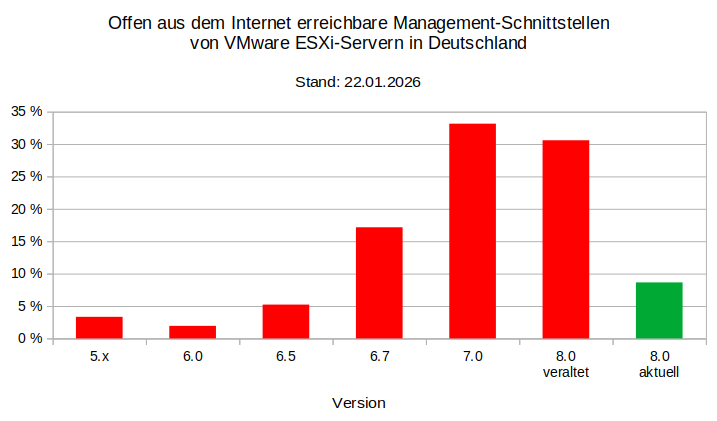
VMware Tools 13.0.10.0 | 20 JAN 2026 | Build No 25056151
Donnerstag, Januar 22nd, 2026Lenovo XClarity Essentials OneCLI – how to set energy settings on a VMware ESXi host
Sonntag, November 16th, 2025To set energy settings on a VMware ESXi host using Lenovo XClarity Essentials OneCLI use the onecli.exe config set command with the appropriate UEFI or BMC setting name such as PowerPlatform.PowerBias or Processors.DeterminismSlider to adjust the power profile. You must run OneCLI from a Windows command prompt as an administrator with administrator privileges and have the necessary credentials to connect to the ESXi host
onecli.exe config set Processors.DeterminismSlider Power –esxi <userid>:<password>@<ESXiHostIP@>
Common Energy Settings
Processors.CStates (e.g., Legacy or Enabled)
Processors.CPUPstateControl (e.g., Legacy or Enabled)
Processors.TurboMode (e.g., Enabled or Disabled)
You may need to explore the specific setting names for your exact server model using onecli.exe config show command to list all available configuration options and their current values
onecli.exe config show –esxi <userid>:<password>@<ESXiHostIP@>
After changing a UEFI/BMC setting a server reboot is required for the changes to take effect
Lenovo XClarity Essentials OneCLI – how to remotely collect system inventory and the First Failure Data Capture (FFDC) inventory from VMware ESXi
Sonntag, November 16th, 2025VMware Tools 12.5.4 | 29 SEP 2025 | Build No 24964629 – this release resolves CVE-2025-41244 and CVE-2025-41246
Freitag, Oktober 3rd, 2025VMware Tools 13.0.5.0 | 29 SEP 2025 | Build No 24915695 – this release resolves CVE-2025-41244 and CVE-2025-41246
Freitag, Oktober 3rd, 2025Thomas-Krenn.AG – Virtualisierung im Vergleich Proxmox VE Microsoft VMware by Broadcom
Freitag, August 15th, 2025VMware Tools 13.0.0 | 17 JUN 2025 | Build No 24696409 – release notes
Donnerstag, Juni 19th, 2025VMware Tools 12.5.2 | 12 MAY 2025 | Build No 24697584 – release notes
Donnerstag, Mai 15th, 2025RVTools 4.7.1 – the best practice health analyzer for VMware vSphere
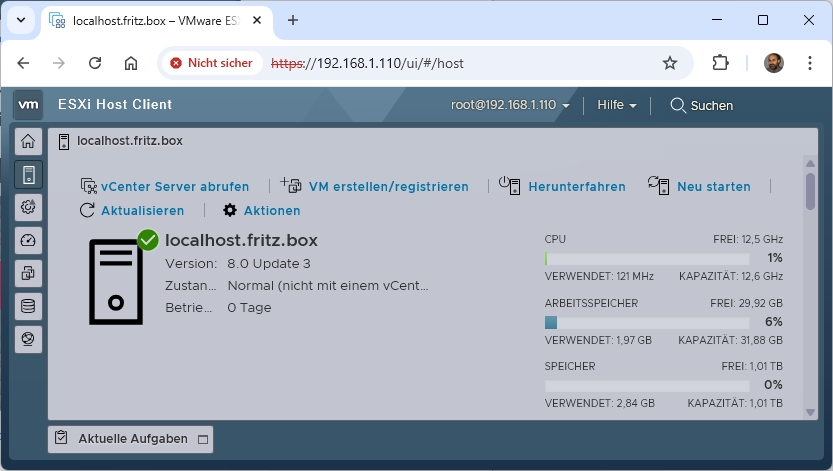
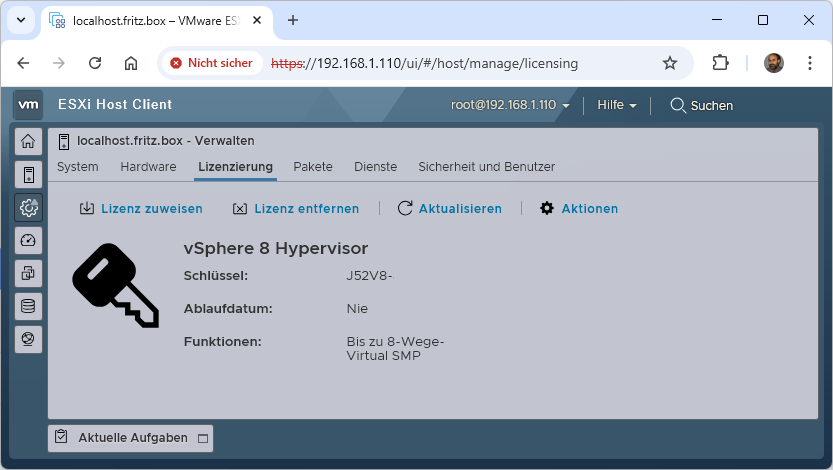
Mittwoch, April 30th, 2025VMware ESXi 8.0U3e – is back with a free version
Dienstag, April 15th, 2025 Broadcom makes available the VMware vSphere Hypervisor Version 8 an entry-level hypervisor but no Broadcom support is available for this offering and it is for non-production use and cannot connect to vCenter and therefore cannot be centrally managed. You can remotely manage individual vSphere Hypervisor hosts by using the VMware Host Client and the vSphere Hypervisor supports a maximum of 8 virtual CPUs per virtual machine you can download it free of charge from the Broadcom Support Portal