Convert Ingres to Oracle – the easiest way to copy your data to another database

Convert Ingres to Oracle – the easiest way to copy your data to another database

 Actian Ingres 10.0 Enterprise Edition – with Linux x86 64-bit


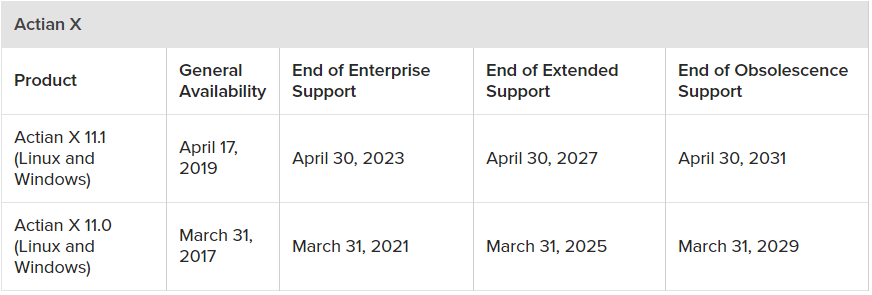
Actian Ingres Database – Product Support Lifecycle Policy September 2022

Starting with Ingres 10.0 databases are created with Multi Version Concurrency Control (MVCC) as a default also databases upgraded from prior releases also have MVCC enabled
Table Requirements
MVCC only applies to tables that meet the following criteria:
They were not created with a page size of 2K
They are permanent tables; i.e., they are not temporary tables
They are not using the rtree storage structure
They are not one of the core system catalogs (i.e., iirelation, iiattribute)
They are not gateway tables
They do not contain data rows that are larger than the table’s page size
Other Requirements
You are not using an isolation level of read uncommitted
You are not using readlock = nolock
Logging has not been disabled, unless you are only issuing read-only queries
Fast commits have not been disabled
You are not running in a cluster environment
The easiest method to check a database’s MVCC status is to use:
We can however disable MVCC using:
Actian Ingres Database – Product Support Lifecycle Policy April 2022

 DTM Migration Kit – is an advanced data management tool that designed for the multi-vendor environment and rarely used database support. It allows user database administrator or developer to import data from most popular formats to export database content to migrate data from different data sources