Archive for the ‘Addon Software’ Category
Red Hat Enterprise Linux ‚Rootless Podman‘ – understanding ‚root‘ inside and outside a container
Sonntag, Oktober 25th, 2026Linux on Debian- and Ubuntu-based systems – the purpose of ‚unattended-upgrades‘ & ’needrestart‘ is to keep the computer current with the latest security and other updates automatically
Donnerstag, Oktober 22nd, 2026root@pve-tailcat-02:~# apt-get updates -y
root@pve-tailcat-02:~# apt-get install unattended-upgrades
Reading package lists… Done
Building dependency tree… Done
Reading state information… Done
unattended-upgrades is already the newest version (2.12ubuntu9).
Solving dependencies… Done
0 upgraded, 0 newly installed, 0 to remove and 26 not upgraded.
root@pve-tailcat-02:~#
root@pve-tailcat-02:~# apt-get install needrestart
Reading package lists… Done
Building dependency tree… Done
Reading state information… Done
needrestart is already the newest version (3.11-1ubuntu2).
Solving dependencies… Done
0 upgraded, 0 newly installed, 0 to remove and 26 not upgraded.
root@pve-tailcat-02:~#
root@pve-tailcat-02:~# vi /etc/needrestart/needrestart.conf
$nrconf{restart} = ‚a‘;
root@pve-tailcat-02:~#
root@pve-tailcat-02:~# systemctl edit apt-daily.timer
[Timer]
OnCalendar=
OnCalendar=hourly
RandomizedDelaySec=10m
Successfully installed edited file ‚/etc/systemd/system/apt-daily.timer.d/override.conf‘.
root@pve-tailcat-02:~#
root@pve-tailcat-02:~# dpkg-reconfigure -plow unattended-upgrades
root@pve-tailcat-02:~#
root@pve-tailcat-02:~# apt-config dump APT::Periodic
APT::Periodic „“;
APT::Periodic::Update-Package-Lists „1“;
APT::Periodic::Unattended-Upgrade „1“;
root@pve-tailcat-02:~#
root@pve-tailcat-02:/var/log# systemctl status unattended-upgrades.service
● unattended-upgrades.service – Unattended Upgrades Shutdown
Loaded: loaded (/usr/lib/systemd/system/unattended-upgrades.service; enabled; preset: enabled)
Active: active (running) since Thu 2026-10-22 12:54:29 CEST; 1h 27min ago
Invocation: 19d7cf72aeb64c0ebf423e9817ff841f
Docs: man:unattended-upgrade(8)
Main PID: 8797 (unattended-upgr)
Tasks: 2 (limit: 7681)
Memory: 14.6M (peak: 14.9M)
CPU: 207ms
CGroup: /system.slice/unattended-upgrades.service
└─8797 /usr/bin/python3 /usr/share/unattended-upgrades/unattended-upgrade-shutdown –wait-for-signal
root@pve-tailcat-02:~#
root@pve-tailcat-02:~# unattended-upgrades -d
upgrade result: True No packages found that can be upgraded unattended and no pending auto-removals
Extracting content from /var/log/unattended-upgrades/unattended-upgrades-dpkg.log since 2026-10-22 14:29:39
root@pve-tailcat-02:~#
root@pve-tailcat-02:~# apt list –upgradable
root@pve-tailcat-02:~#
root@pve-tailcat-02:~# less /var/log/dpkg.log
…
2026-10-23 06:57:51 upgrade zlib1g:amd64 1:1.3.dfsg+really1.3.1-1ubuntu3.1 1:1.3.dfsg+really1.3.1-1ubuntu3.2
2026-10-23 06:57:51 status triggers-pending libc-bin:amd64 2.43-2ubuntu2.4
2026-10-23 06:57:51 status half-configured zlib1g:amd64 1:1.3.dfsg+really1.3.1-1ubuntu3.1
2026-10-23 06:57:51 status unpacked zlib1g:amd64 1:1.3.dfsg+really1.3.1-1ubuntu3.1
2026-10-23 06:57:51 status half-installed zlib1g:amd64 1:1.3.dfsg+really1.3.1-1ubuntu3.1
2026-10-23 06:57:51 status unpacked zlib1g:amd64 1:1.3.dfsg+really1.3.1-1ubuntu3.2
2026-10-23 06:57:51 startup packages configure
2026-10-23 06:57:51 configure zlib1g:amd64 1:1.3.dfsg+really1.3.1-1ubuntu3.2 <none>
2026-10-23 06:57:51 status unpacked zlib1g:amd64 1:1.3.dfsg+really1.3.1-1ubuntu3.2
2026-10-23 06:57:51 status half-configured zlib1g:amd64 1:1.3.dfsg+really1.3.1-1ubuntu3.2
2026-10-23 06:57:51 status installed zlib1g:amd64 1:1.3.dfsg+really1.3.1-1ubuntu3.2
2026-10-23 06:57:51 startup packages configure
2026-10-23 06:57:51 trigproc libc-bin:amd64 2.43-2ubuntu2.4 <none>
2026-10-23 06:57:51 status half-configured libc-bin:amd64 2.43-2ubuntu2.4
2026-10-23 06:57:51 status installed libc-bin:amd64 2.43-2ubuntu2.4
root@pve-tailcat-02:~#
root@pve-tailcat-02:~# grep -A 2 „Commandline:.*upgrade“ /var/log/apt/history.log | tail -n 3
Commandline: /usr/bin/unattended-upgrade
Upgrade: zlib1g:amd64 (1:1.3.dfsg+really1.3.1-1ubuntu3.1, 1:1.3.dfsg+really1.3.1-1ubuntu3.2)
End-Date: 2026-10-23 06:57:51
root@pve-tailcat-02:~#
root@pve-tailcat-02:~# vi /var/log/unattended-upgrades/unattended-upgrades-dpkg.log
Unpacking zlib1g:amd64 (1:1.3.dfsg+really1.3.1-1ubuntu3.2) over (1:1.3.dfsg+really1.3.1-1ubuntu3.1) …^M
Setting up zlib1g:amd64 (1:1.3.dfsg+really1.3.1-1ubuntu3.2) …^M
Processing triggers for libc-bin (2.43-2ubuntu2.4) …^M
Disabling Ubuntu mode, explicit restart mode configured
Restarting services…
/etc/needrestart/restart.d/systemd-manager
systemctl restart rsyslog.service ssh.service systemd-journald.service systemd-networkd.service systemd-resolved.service
Service restarts being deferred:
systemctl restart apt-daily-upgrade.service
systemctl restart networkd-dispatcher.service
systemctl restart systemd-logind.service
systemctl restart unattended-upgrades.service
No containers need to be restarted.
No user sessions are running outdated binaries.
No VM guests are running outdated hypervisor (qemu) binaries on this host.
Log ended: 2026-10-23 06:57:53
root@pve-tailcat-02:~#
PHP2Shell – ein Pflichtvideo für Administratoren
Donnerstag, Oktober 22nd, 2026
Tailscale ‚tailcat‘ v0.7.0 – connects machines over an encrypted connection even when they are on different networks worldwide
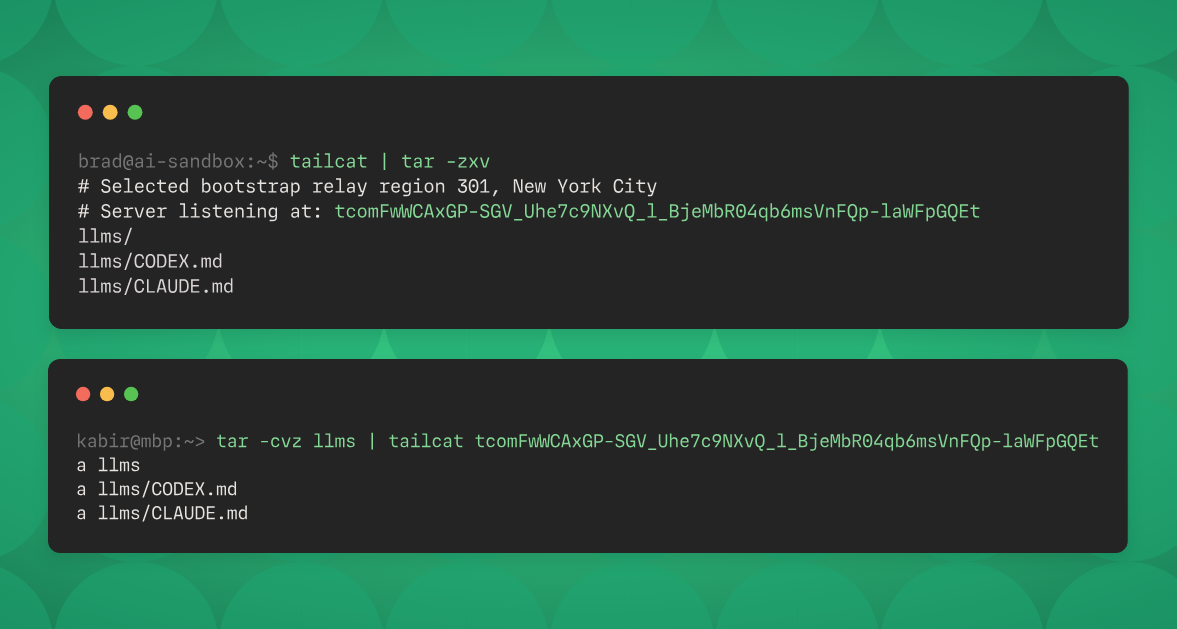
Montag, Oktober 19th, 2026Tailscale ‚tailcat‘ – is both an open-source Go package and a CLI tool using that package it lets you run a server side listener and a client to connect to that server moving bidirectional bytes back and forth
root@pve-tailcat-01:~#
root@pve-tailcat-01:~# ./tailcat >> remote_logs.txt
# Selected bootstrap relay region 303, Frankfurt
# 🐈 Server listening with new address: <tcp…QEv>
root@pve-tailcat-0a:~#
root@pve-tailcat-02:~#
root@pve-tailcat-02:~# echo „Server-Neustart durchgeführt um $(date)“ | ./tailcat <tcp…QEv>
root@pve-tailcat-02:~#
root@pve-tailcat-01:~#
root@pve-tailcat-01:~# cat remote_logs.txt
Server-Neustart durchgeführt um Tue Oct 13 09:36:34 UTC 2026
root@pve-tailcat-01:~#
root@pve-tailcat-02:~# echo „Server-Neustart durchgeführt um $(date)“ | ./tailcat <tcp…QEv>
root@pve-tailcat-01:~#
root@pve-tailcat-02:~#
root@pve-tailcat-01:~# cat remote_logs.txt
Server-Neustart durchgeführt um Tue Oct 13 09:36:34 UTC 2026
Server-Neustart durchgeführt um Tue Oct 13 09:58:13 UTC 2026
root@pve-tailcat-01:~#
root@pve-tailcat-01:~#
root@pve-tailcat-01:~# ./tailcat genkey –key=pve-tailcat-01
# wrote file to /root/.config/tailcat/keys/pve-tailcat-01.private.json
<tcp…pIA>
root@pve-tailcat-01:~#
root@pve-tailcat-01:~# ./tailcat genkey –list
pve-tailcat-01
root@pve-tailcat-01:~#
root@pve-tailcat-01:~#
root@pve-tailcat-01:~# cat tailcat.sh
while true; do
/root/tailcat serve –key=pve-tailcat-01 >> /root/tailcat.log ;
sleep 1 ;
done
root@pve-tailcat-01:~#
root@pve-tailcat-01:~# crontab -l
* * * * * pgrep -x „tailcat“ > /dev/null || /root/tailcat.sh
root@pve-tailcat-01:~#
with Linux
root@pve-tailcat-02:~# vi tailcat.sh
#!/bin/bash
sleep $(( (RANDOM % 59) + 1 ))
echo „$(date +“%d.%m.%Y %H:%M:%S“) Tracking $(uname -n)“ | /root/tailcat <tcp…QEv>
root@pve-tailcat-02:~#
root@pve-tailcat-02:~# crontab -l
00-59/5 * * * * /root/tailcat.sh
root@pve-tailcat-02:~#
with Windows
C:\> notepad C:\Logs\tailcat.bat
set /a „rand=(%RANDOM% %% 59) + 1“
timeout /t %rand% >nul
echo %%Date%% %%Time:~0,8%% Tracking %%ComputerName%% | C:\Logs\tailcat.exe <tcp…QEv>
C:\>
C:\> schtasks /create /tn „tailcat“ /tr „C:\Logs\tailcat.bat“ /sc minute /mo 5 /ru „NT AUTHORITY\SYSTEM“
C:\> schtasks /Query /TN „tailcat“ /V
C:\>
Thomas-Krenn.AG – Windows Server in virtualisierten Umgebungen korrekt lizenzieren
Donnerstag, Oktober 15th, 2026Citrix NetScaler ADC and Citrix NetScaler Gateway – Security Bulletin for CVE-2026-107406
Dienstag, Oktober 13th, 2026 Cloud Software Group strongly urges affected customers of NetScaler ADC and NetScaler Gateway to install the following updated versions as soon as possible
Security Bulletin for CVE-2026-107406
Citrix NetScaler ADC and Citrix NetScaler Gateway 14.1-73.46 and later releases
Citrix NetScaler ADC and Citrix NetScaler Gateway 13.1-64.29 and later releases of 13.1
Citrix NetScaler ADC 14.1-FIPS 14.1-73.46 FIPS and later releases of 14.1-FIPS
Citrix NetScaler ADC 13.1-FIPS and 13.1-NDcPP 13.1.37.283 and later releases of 13.1-FIPS and 13.1-NDcPP
Microsoft – is asking up to € 6.879 for the new Surface Laptop Ultra
Sonntag, Oktober 11th, 2026Red Hat OpenShift – move from Ollama to vLLM
Samstag, Oktober 10th, 2026Microsoft Windows App v2.0.1482.0 – ist ihre sichere Verbindung zu Windows über Windows 365 Azure Virtual Desktop Microsoft Dev Box Remote Apps und Remote-PC(s)
Donnerstag, Oktober 8th, 2026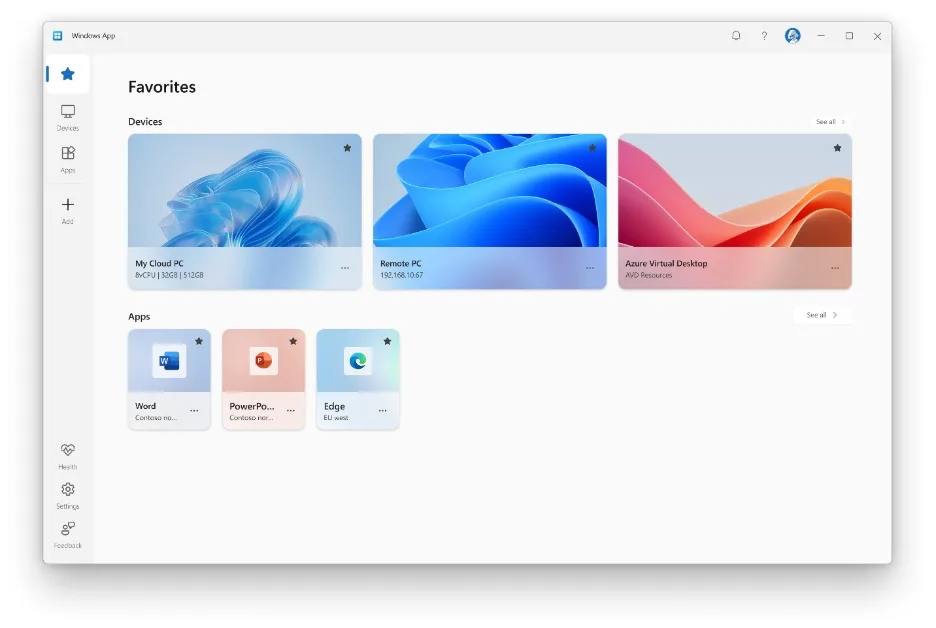
Microsoft Windows 11 Enterprise & Education – Ende des Supports für die Version 23H2 am 10.10.2026
Donnerstag, Oktober 8th, 2026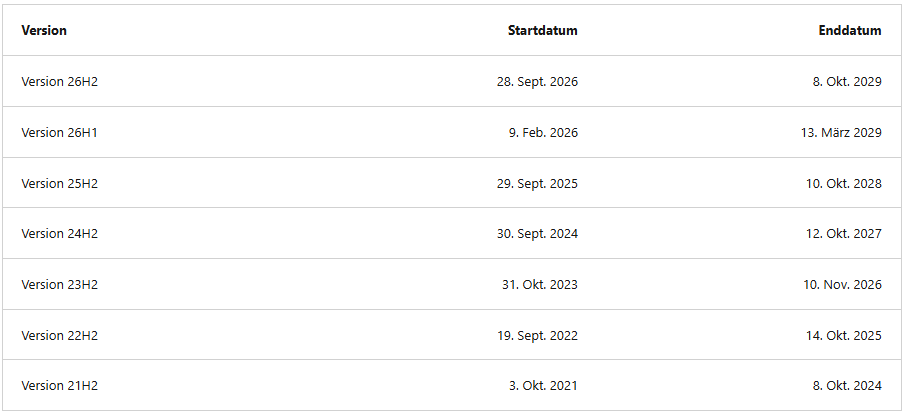
Microsoft Windows 11 Home & Pro – Ende des Supports für die Version 24H2 am 13.10.2026
Donnerstag, Oktober 8th, 2026
Microsoft Windows 11 Version 24H2 – am 13.10.2026 endet der Support für für mehrere Editionen von 24H2 d.h. updaten oder keine Sicherheitspatches mehr
Mittwoch, Oktober 7th, 2026 Microsoft Windows 11 Version 24H2 – das Support Ende steht unmittelbar bevor die Editionen Home Pro Pro Education und Pro for Workstations endet der Support am 13.10.2026 an diesem Tag stellt Microsoft das letzte reguläre Sicherheitsupdate für diese Version bereit