
Archive for the ‘Security Solution’ Category
Residential Proxies – route your internet traffic through real IP addresses assigned by Internet Service Providers (ISPs) to everyday homeowners and household devices
Sonntag, November 1st, 2026Google Chrome OS Version 156.0.8078.74 – steht zum Download bereit
Donnerstag, Oktober 29th, 2026Linux on Debian- and Ubuntu-based systems – the purpose of ‚unattended-upgrades‘ & ’needrestart‘ is to keep the computer current with the latest security and other updates automatically
Donnerstag, Oktober 22nd, 2026root@pve-tailcat-02:~# apt-get updates -y
root@pve-tailcat-02:~# apt-get install unattended-upgrades
Reading package lists… Done
Building dependency tree… Done
Reading state information… Done
unattended-upgrades is already the newest version (2.12ubuntu9).
Solving dependencies… Done
0 upgraded, 0 newly installed, 0 to remove and 26 not upgraded.
root@pve-tailcat-02:~#
root@pve-tailcat-02:~# apt-get install needrestart
Reading package lists… Done
Building dependency tree… Done
Reading state information… Done
needrestart is already the newest version (3.11-1ubuntu2).
Solving dependencies… Done
0 upgraded, 0 newly installed, 0 to remove and 26 not upgraded.
root@pve-tailcat-02:~#
root@pve-tailcat-02:~# vi /etc/needrestart/needrestart.conf
$nrconf{restart} = ‚a‘;
root@pve-tailcat-02:~#
root@pve-tailcat-02:~# systemctl edit apt-daily.timer
[Timer]
OnCalendar=
OnCalendar=hourly
RandomizedDelaySec=10m
Successfully installed edited file ‚/etc/systemd/system/apt-daily.timer.d/override.conf‘.
root@pve-tailcat-02:~#
root@pve-tailcat-02:~# dpkg-reconfigure -plow unattended-upgrades
root@pve-tailcat-02:~#
root@pve-tailcat-02:~# apt-config dump APT::Periodic
APT::Periodic „“;
APT::Periodic::Update-Package-Lists „1“;
APT::Periodic::Unattended-Upgrade „1“;
root@pve-tailcat-02:~#
root@pve-tailcat-02:/var/log# systemctl status unattended-upgrades.service
● unattended-upgrades.service – Unattended Upgrades Shutdown
Loaded: loaded (/usr/lib/systemd/system/unattended-upgrades.service; enabled; preset: enabled)
Active: active (running) since Thu 2026-10-22 12:54:29 CEST; 1h 27min ago
Invocation: 19d7cf72aeb64c0ebf423e9817ff841f
Docs: man:unattended-upgrade(8)
Main PID: 8797 (unattended-upgr)
Tasks: 2 (limit: 7681)
Memory: 14.6M (peak: 14.9M)
CPU: 207ms
CGroup: /system.slice/unattended-upgrades.service
└─8797 /usr/bin/python3 /usr/share/unattended-upgrades/unattended-upgrade-shutdown –wait-for-signal
root@pve-tailcat-02:~#
root@pve-tailcat-02:~# unattended-upgrades -d
upgrade result: True No packages found that can be upgraded unattended and no pending auto-removals
Extracting content from /var/log/unattended-upgrades/unattended-upgrades-dpkg.log since 2026-10-22 14:29:39
root@pve-tailcat-02:~#
root@pve-tailcat-02:~# apt list –upgradable
root@pve-tailcat-02:~#
root@pve-tailcat-02:~# less /var/log/dpkg.log
…
2026-10-23 06:57:51 upgrade zlib1g:amd64 1:1.3.dfsg+really1.3.1-1ubuntu3.1 1:1.3.dfsg+really1.3.1-1ubuntu3.2
2026-10-23 06:57:51 status triggers-pending libc-bin:amd64 2.43-2ubuntu2.4
2026-10-23 06:57:51 status half-configured zlib1g:amd64 1:1.3.dfsg+really1.3.1-1ubuntu3.1
2026-10-23 06:57:51 status unpacked zlib1g:amd64 1:1.3.dfsg+really1.3.1-1ubuntu3.1
2026-10-23 06:57:51 status half-installed zlib1g:amd64 1:1.3.dfsg+really1.3.1-1ubuntu3.1
2026-10-23 06:57:51 status unpacked zlib1g:amd64 1:1.3.dfsg+really1.3.1-1ubuntu3.2
2026-10-23 06:57:51 startup packages configure
2026-10-23 06:57:51 configure zlib1g:amd64 1:1.3.dfsg+really1.3.1-1ubuntu3.2 <none>
2026-10-23 06:57:51 status unpacked zlib1g:amd64 1:1.3.dfsg+really1.3.1-1ubuntu3.2
2026-10-23 06:57:51 status half-configured zlib1g:amd64 1:1.3.dfsg+really1.3.1-1ubuntu3.2
2026-10-23 06:57:51 status installed zlib1g:amd64 1:1.3.dfsg+really1.3.1-1ubuntu3.2
2026-10-23 06:57:51 startup packages configure
2026-10-23 06:57:51 trigproc libc-bin:amd64 2.43-2ubuntu2.4 <none>
2026-10-23 06:57:51 status half-configured libc-bin:amd64 2.43-2ubuntu2.4
2026-10-23 06:57:51 status installed libc-bin:amd64 2.43-2ubuntu2.4
root@pve-tailcat-02:~#
root@pve-tailcat-02:~# grep -A 2 „Commandline:.*upgrade“ /var/log/apt/history.log | tail -n 3
Commandline: /usr/bin/unattended-upgrade
Upgrade: zlib1g:amd64 (1:1.3.dfsg+really1.3.1-1ubuntu3.1, 1:1.3.dfsg+really1.3.1-1ubuntu3.2)
End-Date: 2026-10-23 06:57:51
root@pve-tailcat-02:~#
root@pve-tailcat-02:~# vi /var/log/unattended-upgrades/unattended-upgrades-dpkg.log
Unpacking zlib1g:amd64 (1:1.3.dfsg+really1.3.1-1ubuntu3.2) over (1:1.3.dfsg+really1.3.1-1ubuntu3.1) …^M
Setting up zlib1g:amd64 (1:1.3.dfsg+really1.3.1-1ubuntu3.2) …^M
Processing triggers for libc-bin (2.43-2ubuntu2.4) …^M
Disabling Ubuntu mode, explicit restart mode configured
Restarting services…
/etc/needrestart/restart.d/systemd-manager
systemctl restart rsyslog.service ssh.service systemd-journald.service systemd-networkd.service systemd-resolved.service
Service restarts being deferred:
systemctl restart apt-daily-upgrade.service
systemctl restart networkd-dispatcher.service
systemctl restart systemd-logind.service
systemctl restart unattended-upgrades.service
No containers need to be restarted.
No user sessions are running outdated binaries.
No VM guests are running outdated hypervisor (qemu) binaries on this host.
Log ended: 2026-10-23 06:57:53
root@pve-tailcat-02:~#
PHP2Shell – ein Pflichtvideo für Administratoren
Donnerstag, Oktober 22nd, 2026
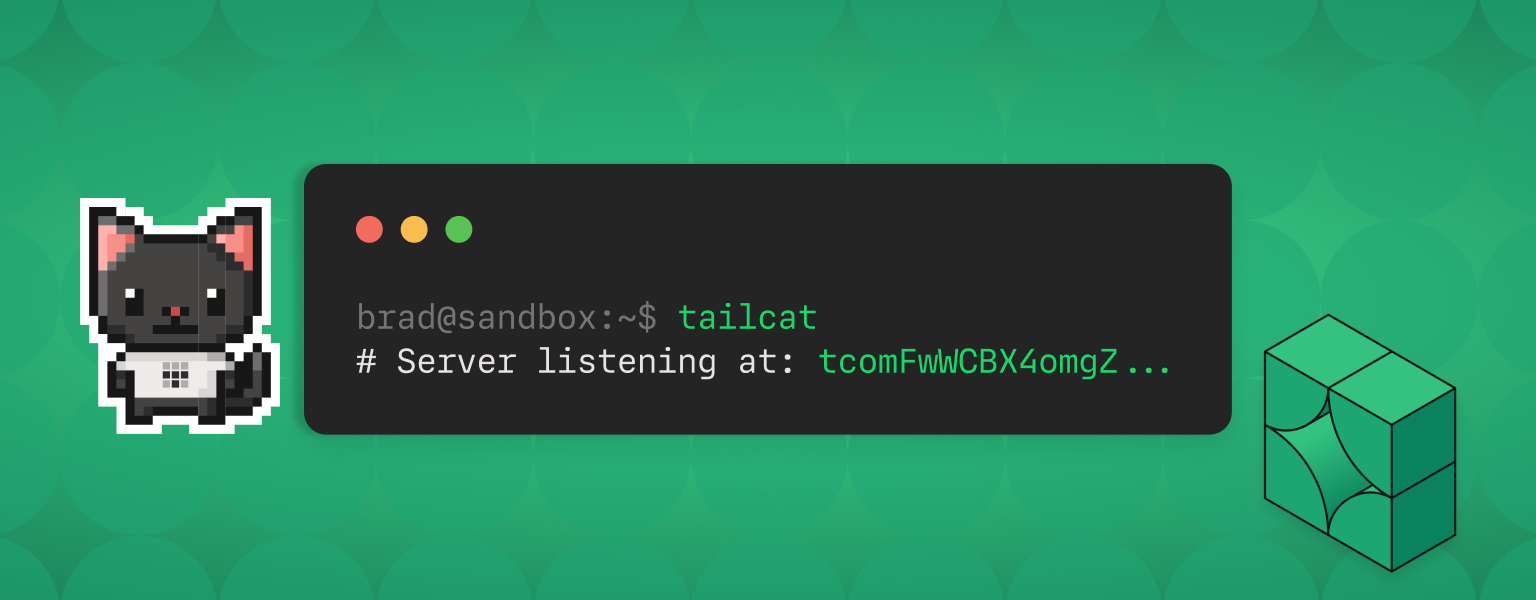
Tailscale ‚tailcat‘ v0.7.0 – connects machines over an encrypted connection even when they are on different networks worldwide
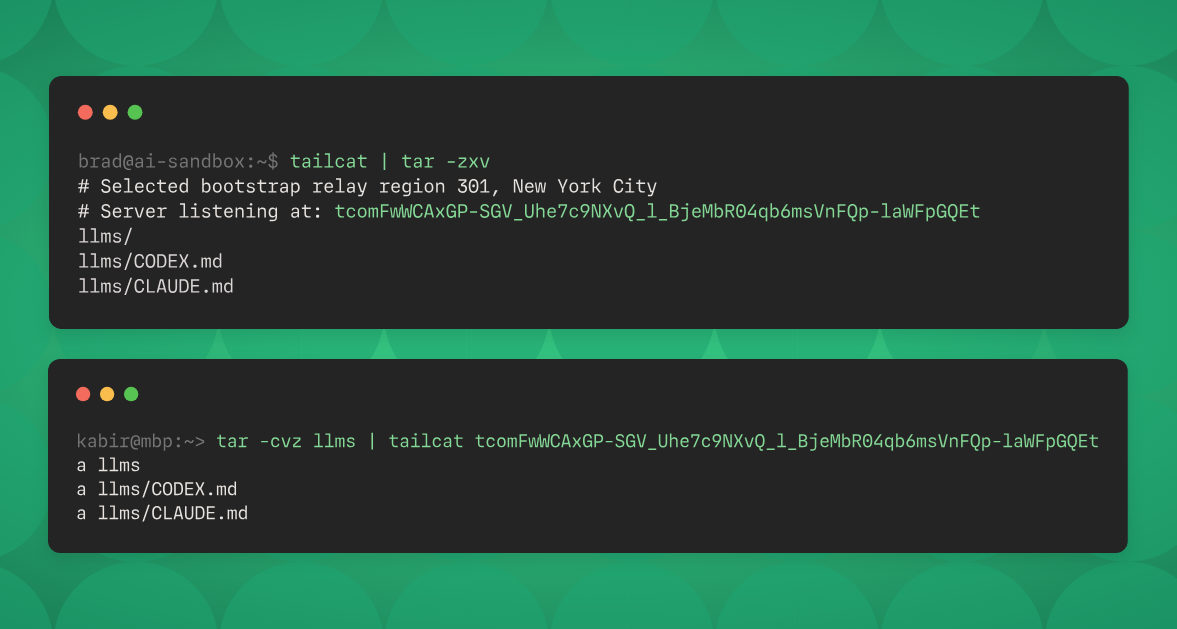
Montag, Oktober 19th, 2026Tailscale ‚tailcat‘ – is both an open-source Go package and a CLI tool using that package it lets you run a server side listener and a client to connect to that server moving bidirectional bytes back and forth
root@pve-tailcat-01:~#
root@pve-tailcat-01:~# ./tailcat >> remote_logs.txt
# Selected bootstrap relay region 303, Frankfurt
# 🐈 Server listening with new address: <tcp…QEv>
root@pve-tailcat-0a:~#
root@pve-tailcat-02:~#
root@pve-tailcat-02:~# echo „Server-Neustart durchgeführt um $(date)“ | ./tailcat <tcp…QEv>
root@pve-tailcat-02:~#
root@pve-tailcat-01:~#
root@pve-tailcat-01:~# cat remote_logs.txt
Server-Neustart durchgeführt um Tue Oct 13 09:36:34 UTC 2026
root@pve-tailcat-01:~#
root@pve-tailcat-02:~# echo „Server-Neustart durchgeführt um $(date)“ | ./tailcat <tcp…QEv>
root@pve-tailcat-01:~#
root@pve-tailcat-02:~#
root@pve-tailcat-01:~# cat remote_logs.txt
Server-Neustart durchgeführt um Tue Oct 13 09:36:34 UTC 2026
Server-Neustart durchgeführt um Tue Oct 13 09:58:13 UTC 2026
root@pve-tailcat-01:~#
root@pve-tailcat-01:~#
root@pve-tailcat-01:~# ./tailcat genkey –key=pve-tailcat-01
# wrote file to /root/.config/tailcat/keys/pve-tailcat-01.private.json
<tcp…pIA>
root@pve-tailcat-01:~#
root@pve-tailcat-01:~# ./tailcat genkey –list
pve-tailcat-01
root@pve-tailcat-01:~#
root@pve-tailcat-01:~#
root@pve-tailcat-01:~# cat tailcat.sh
while true; do
/root/tailcat serve –key=pve-tailcat-01 >> /root/tailcat.log ;
sleep 1 ;
done
root@pve-tailcat-01:~#
root@pve-tailcat-01:~# crontab -l
* * * * * pgrep -x „tailcat“ > /dev/null || /root/tailcat.sh
root@pve-tailcat-01:~#
with Linux
root@pve-tailcat-02:~# vi tailcat.sh
#!/bin/bash
sleep $(( (RANDOM % 59) + 1 ))
echo „$(date +“%d.%m.%Y %H:%M:%S“) Tracking $(uname -n)“ | /root/tailcat <tcp…QEv>
root@pve-tailcat-02:~#
root@pve-tailcat-02:~# crontab -l
00-59/5 * * * * /root/tailcat.sh
root@pve-tailcat-02:~#
with Windows
C:\> notepad C:\Logs\tailcat.bat
set /a „rand=(%RANDOM% %% 59) + 1“
timeout /t %rand% >nul
echo %%Date%% %%Time:~0,8%% Tracking %%ComputerName%% | C:\Logs\tailcat.exe <tcp…QEv>
C:\>
C:\> schtasks /create /tn „tailcat“ /tr „C:\Logs\tailcat.bat“ /sc minute /mo 5 /ru „NT AUTHORITY\SYSTEM“
C:\> schtasks /Query /TN „tailcat“ /V
C:\>
Citrix NetScaler ADC and Citrix NetScaler Gateway – Security Bulletin for CVE-2026-107406
Dienstag, Oktober 13th, 2026 Cloud Software Group strongly urges affected customers of NetScaler ADC and NetScaler Gateway to install the following updated versions as soon as possible
Security Bulletin for CVE-2026-107406
Citrix NetScaler ADC and Citrix NetScaler Gateway 14.1-73.46 and later releases
Citrix NetScaler ADC and Citrix NetScaler Gateway 13.1-64.29 and later releases of 13.1
Citrix NetScaler ADC 14.1-FIPS 14.1-73.46 FIPS and later releases of 14.1-FIPS
Citrix NetScaler ADC 13.1-FIPS and 13.1-NDcPP 13.1.37.283 and later releases of 13.1-FIPS and 13.1-NDcPP
Google Chrome OS Version 155.0.8059.40 – steht zum Download bereit
Mittwoch, Oktober 7th, 2026Citrix NetScaler ADC and Citrix NetScaler Gateway – Security Bulletin for CVE-2026-88771 CVE-2026-88772 CVE-2026-88773 CVE-2026-88774 CVE-2026-88775 CVE-2026-88776 CVE-2026-88777 and CVE-2026-88778
Montag, September 28th, 2026Citrix NetScaler ADC and Citrix NetScaler Gateway 14.1 BEFORE 14.1-73.37
Citrix NetScaler ADC and Citrix NetScaler Gateway 13.1 BEFORE 13.1-64.23
Citrix NetScaler ADC FIPS BEFORE 14.1-73.37 FIPS
Citrix NetScaler ADC FIPS and NDcPP BEFORE 13.1-37.279
Ludwig-Maximilians-Universität München (LMU) – Cyberangriff und dabei sind Daten von Studierenden abgeflossen
Sonntag, September 20th, 2026Google Chrome OS Version 153.0.8010.48 – steht zum Download bereit
Mittwoch, September 16th, 2026Bundesamt für Sicherheit in der Informationstechnik (BSI) – eine Fritz!Box Funktion wird zum Risiko
Samstag, September 12th, 2026 Es geht um den Fernzugriff der es ermöglicht auch von außerhalb des eigenen Zuhauses über das Internet auf den Router zuzugreifen diese Verbindung kann jedoch ein Einfallstor für Angreifer darstellen weshalb das Bundesamt für Sicherheit in der Informationstechnik (BSI) zur Vorsicht rät
Google Chrome OS Version 152.0.7977.83 – steht zum Download bereit
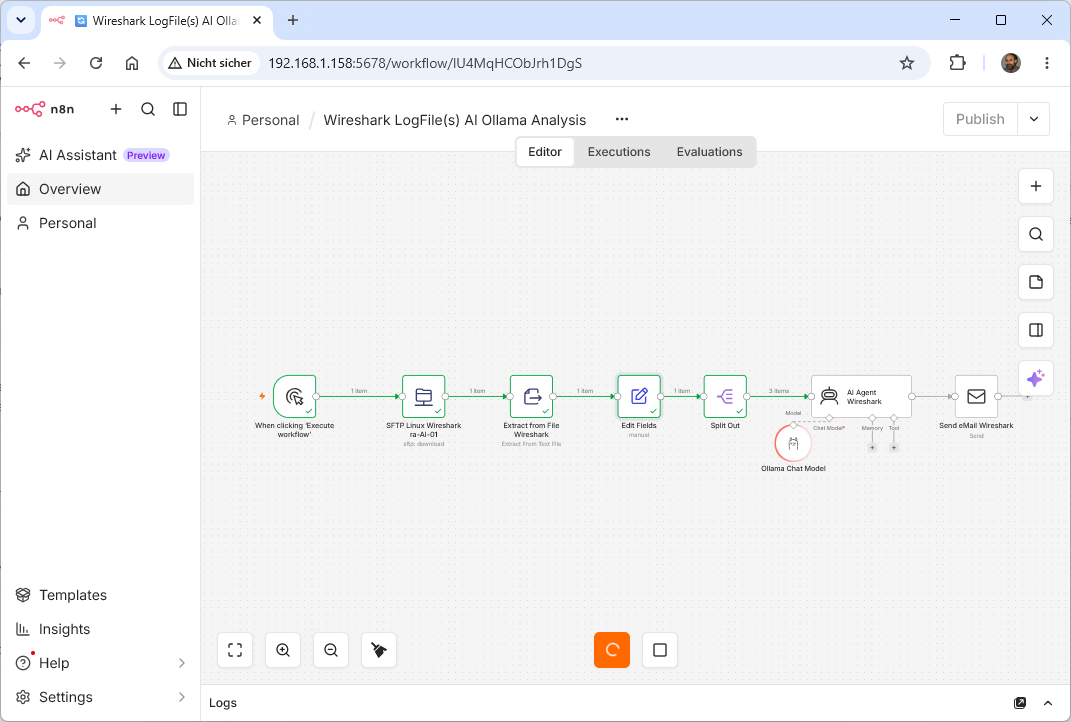
Sonntag, September 6th, 2026AI Workflow Automation N8N 2.36.8 – how to record a Wireshark packet capture with AI by exporting packet details as text and feeding them into an AI model
Freitag, September 4th, 2026At first LLMs cannot open raw „*.pcap“ files directly you must first convert the data into a readable format and do not try to upload millions of rows use Wireshark display filters (like http ip.addr == 192.168.1.1 or tcp.flags.syn == 1) to isolate the suspicious or relevant traffic
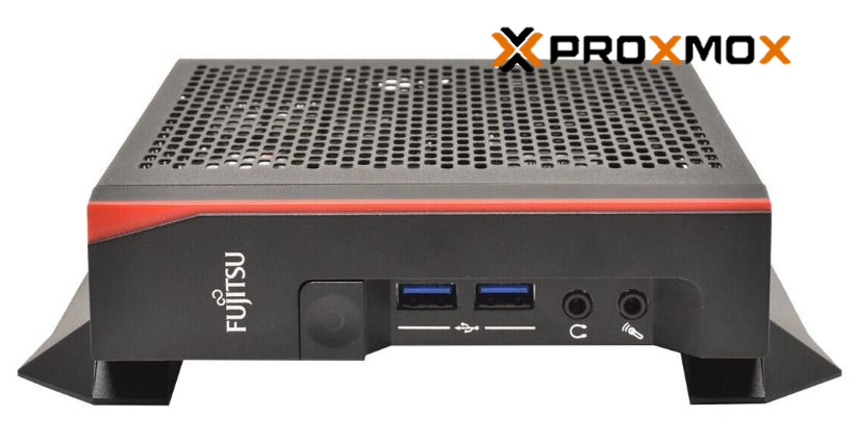
 FRITZ!Box Packet Sniffer – capture network traffic directly on the FRITZ!Box and record it live using Wireshark
Example of a Wireshark Display Filter for an IP client in a home lab
!ip.dst==192.168.1.0/24 && ip.src==192.168.1.182 || !ip.src==192.168.1.0/24 && ip.dst==192.168.1.182
Example of an export via the command line using tshark
root@js-FUTRO-S740:/tmp# tshark -r /tmp/wireshark_LONG.pcapng -Y ‚!ip.dst==192.168.1.0/24 && ip.src==192.168.1.182 || !ip.src==192.168.1.0/24 && ip.dst==192.168.1.182‘ -w /tmp/wireshark_SHORT.pcapng
root@js-FUTRO-S740:/tmp# tshark -r /tmp/wireshark_SHORT.pcapng > /tmp/wireshark_SHORT.txt

Du bist ein erfahrener Network Security Analyst Wireshark-Experte und Network Engineer –
analysiere die bereitgestellte Wireshark-Datei (.pcap / .pcapng) systematisch und erstelle einen technisch fundierten Analysebericht
1. Executive Summary
Fasse die wichtigsten Erkenntnisse kurz zusammen:
Was für Netzwerkverkehr wurde beobachtet?
Welche Systeme/IP-Adressen kommunizieren miteinander?
Welche Protokolle und Ports werden verwendet?
Gibt es Auffälligkeiten, Fehler oder Sicherheitsrisiken?
Gibt es Hinweise auf Fehlkonfigurationen, Performance-Probleme oder verdächtigen Traffic?
Bewerte den Gesamtzustand mit:
🟢 GREEN – unauffällig / erwartungsgemäß
🟡 YELLOW – auffällig / weitere Untersuchung empfohlen
🔴 RED – kritisch / unmittelbare Untersuchung erforderlich
2. Traffic-Light-Matrix
Erstelle eine übersichtliche Matrix:
Bereich Status Bewertung Evidence / Begründung Empfehlung
Gesamt-Traffic🟢/🟡/🔴
IP-Kommunikation🟢/🟡/🔴
TCP🟢/🟡/🔴
UDP🟢/🟡/🔴
DNS🟢/🟡/🔴
HTTP/HTTPS🟢/🟡/🔴
TLS🟢/🟡/🔴
DHCP🟢/🟡/🔴
ARP🟢/🟡/🔴
ICMP🟢/🟡/🔴
Broadcast/Multicast🟢/🟡/🔴
TCP Retransmissions🟢/🟡/🔴
TCP Resets🟢/🟡/🔴
Connection Errors🟢/🟡/🔴
Security Indicators🟢/🟡/🔴
Performance🟢/🟡/🔴
3. Netzwerk-Topologie
Identifiziere möglichst:
Source IPs
Destination IPs
Source/Destination MAC-Adressen
Ports
Protokolle
Kommunikationsbeziehungen
Client/Server-Rollen
interne vs. externe Kommunikation
Erstelle eine Tabelle:
Source Destination Protocol Port Packets Bytes Role Assessment wenn möglich, identifiziere die Top Talkers nach Paketen und Bytes.
4. Protokollanalyse
Analysiere die wichtigsten Protokolle detailliert.
Prüfe insbesondere:
TCP
SYN/SYN-ACK/ACK
Connection Establishment
Retransmissions
Duplicate ACKs
Out-of-Order Packets
Zero Window
Window Size
TCP Resets
ungewöhnliche Connection Patterns
UDP
ungewöhnlich hohe Paketanzahl
ungewöhnlich große Pakete
mögliche Scans oder Flooding-Muster
DNS/NTP/SNMP/andere UDP-basierte Kommunikation
DNS
häufige Queries
ungewöhnliche Domains
NXDOMAIN-Raten
sehr lange oder zufällig wirkende Domainnamen
mögliche DNS-Tunneling-Indikatoren
externe DNS-Server
HTTP/HTTPS/TLS
verwendete Hosts
HTTP Methods
Status Codes
TLS-Versionen
Zertifikatsinformationen, sofern vorhanden
SNI
auffällige oder veraltete Protokolle
unverschlüsselter Datenverkehr
ARP
normale Requests/Replies
ungewöhnlich viele ARP Requests
mögliche ARP Spoofing/Poisoning-Indikatoren
wechselnde MAC-Adressen für dieselbe IP
5. Security Analysis
Suche aktiv nach möglichen Security Indicators:
Port Scanning
Host Scanning
Brute-Force-Muster
Command-and-Control-Indikatoren
Malware-ähnlicher Traffic
ungewöhnliche externe Verbindungen
Datenexfiltration
DNS Tunneling
ARP Spoofing
ungewöhnliche Beaconing-Intervalle
ungewöhnliche Payload-Größen
verdächtige User Agents
ungewöhnliche Ports
unerwartete Protokolle
Kommunikation mit unbekannten externen Hosts
Wichtig: Unterscheide klar zwischen:
tatsächlich nachgewiesenen Auffälligkeiten,
starken Indikatoren,
möglichen Hypothesen.
Behaupte niemals einen Angriff oder eine Kompromittierung allein aufgrund eines schwachen Indikators.
6. Performance Analysis
Untersuche:
Latency
TCP RTT
Retransmission Rate
Packet Loss Indikatoren
TCP Window Problems
Connection Setup Time
ungewöhnliche Delays
Throughput
Burst Traffic
hohe Broadcast-/Multicast-Raten
Bewerte jeden relevanten Punkt mit 🟢 🟡 oder 🔴.
7. Anomalieanalyse
Suche nach Traffic-Mustern, die vom normalen Verhalten abweichen.
Für jede Anomalie:
Severity: 🟢 / 🟡 / 🔴
Time: Zeitpunkt oder Zeitraum
Source: IP/Host
Destination: IP/Host
Protocol:
Evidence: konkrete Pakete/Flows/Statistiken
Interpretation:
Confidence: Low / Medium / High
Recommended Action:
8. Priorisierte Findings
Erstelle anschließend:
Priority Finding Severity Evidence Confidence Recommended Action
1 🔴 2 🟡 3 🟢
Sortiere nach technischem Risiko und Relevanz, nicht einfach nach Anzahl der Pakete.
9. Wireshark Display Filters
Gib für jedes relevante Finding passende Wireshark Display Filters an.
Beispiele:
tcp.analysis.retransmission
tcp.analysis.duplicate_ack
tcp.flags.syn == 1
tcp.flags.reset == 1
dns
http
tls
arp
icmp
Erstelle zusätzlich spezifische Filter für die tatsächlich gefundenen IPs, Ports, Domains oder Protokolle.
10. Final Traffic-Light Dashboard
Schließe den Bericht mit einem kompakten Dashboard ab:
Category Status
Network Health 🟢/🟡/🔴
Security 🟢/🟡/🔴
Performance 🟢/🟡/🔴
Protocol Health 🟢/🟡/🔴
Configuration 🟢/🟡/🔴
Overall Assessment 🟢/🟡/🔴
Ampel-Regeln
🟢 GREEN: Kein relevanter Hinweis auf ein Problem.
🟡 YELLOW: Auffälligkeit vorhanden, aber nicht ausreichend für eine kritische Bewertung. Weitere Untersuchung empfohlen.
🔴 RED: Starke Evidenz für ein relevantes Security-, Performance- oder Netzwerkproblem.
Wichtig
Erfinde keine Daten, IPs, Domains oder Ereignisse.
Verwende ausschließlich Informationen, die aus der PCAP-Datei oder eindeutig daraus abgeleiteten Statistiken stammen.
Gib bei jeder kritischen Aussage die zugrunde liegende Evidence an.
Trenne Fakten von Interpretation und Hypothesen.
Wenn die PCAP keine ausreichenden Informationen für eine Aussage enthält, schreibe ausdrücklich „nicht bestimmbar anhand der vorliegenden PCAP“.
Bewerte nicht nur einzelne Pakete, sondern auch Kommunikationsmuster und zeitliche Zusammenhänge.
Hebe besonders relevante Findings hervor und vermeide eine reine Auflistung unkritischer Pakete.
Ziel: Ein Bericht, der sowohl für einen Network Engineer als auch für einen Security Analyst verständlich ist und anhand der Traffic-Light-Matrix sofort erkennen lässt, wo Handlungsbedarf besteht.