TNSLSNR for Linux: Version 21.0.0.0.0 – Production System parameter file is /opt/oracle/homes/OraDBHome21cXE/network/admin/listener.ora Log messages written to /opt/oracle/diag/tnslsnr/66096a703aa1/listener/alert/log.xml Listening on: (DESCRIPTION=(ADDRESS=(PROTOCOL=ipc)(KEY=EXTPROC_FOR_XE))) Listening on: (DESCRIPTION=(ADDRESS=(PROTOCOL=tcp)(HOST=0.0.0.0)(PORT=1521)))
Connecting to (DESCRIPTION=(ADDRESS=(PROTOCOL=IPC)(KEY=EXTPROC_FOR_XE))) STATUS of the LISTENER ———————— Alias LISTENER Version TNSLSNR for Linux: Version 21.0.0.0.0 – Production Start Date 09-FEB-2026 16:32:27 Uptime 0 days 0 hr. 0 min. 0 sec Trace Level off Security ON: Local OS Authentication SNMP OFF Default Service XE Listener Parameter File /opt/oracle/homes/OraDBHome21cXE/network/admin/listener.ora Listener Log File /opt/oracle/diag/tnslsnr/66096a703aa1/listener/alert/log.xml Listening Endpoints Summary… (DESCRIPTION=(ADDRESS=(PROTOCOL=ipc)(KEY=EXTPROC_FOR_XE))) (DESCRIPTION=(ADDRESS=(PROTOCOL=tcp)(HOST=0.0.0.0)(PORT=1521))) The listener supports no services The command completed successfully ORACLE instance started.
Total System Global Area 1610612120 bytes Fixed Size 9686424 bytes Variable Size 637534208 bytes Database Buffers 956301312 bytes Redo Buffers 7090176 bytes Database mounted. Database opened.
CONTAINER: Resetting SYS and SYSTEM passwords.
User altered.
######################### DATABASE IS READY TO USE! #########################
################################################ NOTICE: YOU ARE USING AN OLD IMAGE VERSION! PLEASE CONSIDER UPGRADING TO gvenzl/oracle-free! ################################################
################################################################## CONTAINER: The following output is now from the alert_XE.log file: ################################################################## 2026-02-09T16:32:40.673697+00:00 Resize operation completed for file# 201, fname /opt/oracle/oradata/XE/temp01.dbf, old size 2048K, new size 12288K 2026-02-09T16:32:40.959467+00:00 XEPDB1(3):Started service freepdb1/freepdb1/freepdb1 XEPDB1(3):Opening pdb with Resource Manager plan: DEFAULT_PLAN Pluggable database XEPDB1 opened read write Starting background process CJQ0 2026-02-09T16:32:41.829883+00:00 CJQ0 started with pid=59, OS id=226 Completed: ALTER DATABASE OPEN 2026-02-09T16:33:44.117281+00:00 TABLE SYS.WRP$_REPORTS: ADDED INTERVAL PARTITION SYS_P348 (5884) VALUES LESS THAN (TO_DATE(‚ 2026-02-10 01:00:00‘, ‚SYYYY-MM-DD HH24:MI:SS‘, ‚NLS_CALENDAR=GREGORIAN‘)) TABLE SYS.WRP$_REPORTS_DETAILS: ADDED INTERVAL PARTITION SYS_P349 (5884) VALUES LESS THAN (TO_DATE(‚ 2026-02-10 01:00:00‘, ‚SYYYY-MM-DD HH24:MI:SS‘, ‚NLS_CALENDAR=GREGORIAN‘)) TABLE SYS.WRP$_REPORTS_TIME_BANDS: ADDED INTERVAL PARTITION SYS_P352 (5883) VALUES LESS THAN (TO_DATE(‚ 2026-02-09 01:00:00‘, ‚SYYYY-MM-DD HH24:MI:SS‘, ‚NLS_CALENDAR=GREGORIAN‘)) 2026-02-09T16:37:42.937472+00:00 Thread 1 advanced to log sequence 20 (LGWR switch), current SCN: 2977113 Current log# 1 seq# 20 mem# 0: /opt/oracle/oradata/XE/redo01.log 2026-02-09T16:37:49.373157+00:00 XEPDB1(3):TABLE SYS.WRI$_OPTSTAT_HISTHEAD_HISTORY: ADDED INTERVAL PARTITION SYS_P360 (46061) VALUES LESS THAN (TO_DATE(‚ 2026-02-10 00:00:00‘, ‚SYYYY-MM-DD HH24:MI:SS‘, ‚NLS_CALENDAR=GREGORIAN‘)) XEPDB1(3):TABLE SYS.WRI$_OPTSTAT_HISTGRM_HISTORY: ADDED INTERVAL PARTITION SYS_P363 (46061) VALUES LESS THAN (TO_DATE(‚ 2026-02-10 00:00:00‘, ‚SYYYY-MM-DD HH24:MI:SS‘, ‚NLS_CALENDAR=GREGORIAN‘)) 2026-02-09T16:37:53.282430+00:00 Thread 1 advanced to log sequence 21 (LGWR switch), current SCN: 2980174 Current log# 2 seq# 21 mem# 0: /opt/oracle/oradata/XE/redo02.log
root@pve-oraDB-01:~#
root@pve-oraDB-01:~# docker exec -it oracle-xe sqlplus / as sysdba
SQL*Plus: Release 21.0.0.0.0 – Production on Mon Feb 9 19:06:42 2026 Version 21.3.0.0.0
Copyright (c) 1982, 2021, Oracle. All rights reserved.
Connected to an idle instance.
SQL> startup ORACLE instance started.
Total System Global Area 1610612120 bytes Fixed Size 9686424 bytes Variable Size 637534208 bytes Database Buffers 956301312 bytes Redo Buffers 7090176 bytes Database mounted. Database opened. SQL> SQL> shutdown Database closed. Database dismounted. ORACLE instance shut down. SQL> SQL> exit Disconnected from Oracle Database 21c Express Edition Release 21.0.0.0.0 – Production Version 21.3.0.0.0
root@pve-8n8-01:~# apt-get remove $(dpkg –get-selections docker.io docker-compose docker-compose-v2 docker-doc podman-docker containerd runc | cut -f1) dpkg: no packages found matching docker.io dpkg: no packages found matching docker-compose dpkg: no packages found matching docker-compose-v2 dpkg: no packages found matching docker-doc dpkg: no packages found matching podman-docker dpkg: no packages found matching containerd dpkg: no packages found matching runc Reading package lists… Done Building dependency tree… Done Reading state information… Done 0 upgraded, 0 newly installed, 0 to remove and 0 not upgraded.
root@pve-8n8-01:~# systemctl status docker ● docker.service – Docker Application Container Engine Loaded: loaded (/usr/lib/systemd/system/docker.service; enabled; preset: enabled) Active: active (running) since Sun 2025-12-28 16:53:38 UTC; 1min 5s ago TriggeredBy: ● docker.socket Docs: https://docs.docker.com Main PID: 2146 (dockerd) Tasks: 10 Memory: 26.5M (peak: 27.0M) CPU: 676ms CGroup: /system.slice/docker.service └─2146 /usr/bin/dockerd -H fd:// –containerd=/run/containerd/containerd.sock
Dec 28 16:53:37 pve-8n8-01 dockerd[2146]: time=“2025-12-28T16:53:37.872460199Z“ level=info msg=“Restoring containers: start.“ Dec 28 16:53:37 pve-8n8-01 dockerd[2146]: time=“2025-12-28T16:53:37.923005060Z“ level=info msg=“Deleting nftables IPv4 rules“ error=“exit status 1″ Dec 28 16:53:37 pve-8n8-01 dockerd[2146]: time=“2025-12-28T16:53:37.936991908Z“ level=info msg=“Deleting nftables IPv6 rules“ error=“exit status 1″ Dec 28 16:53:38 pve-8n8-01 dockerd[2146]: time=“2025-12-28T16:53:38.476295073Z“ level=info msg=“Loading containers: done.“ Dec 28 16:53:38 pve-8n8-01 dockerd[2146]: time=“2025-12-28T16:53:38.493143726Z“ level=info msg=“Docker daemon“ commit=fbf3ed2 containerd-snapshotter=true storage-driver=overlayfs ve> Dec 28 16:53:38 pve-8n8-01 dockerd[2146]: time=“2025-12-28T16:53:38.493394785Z“ level=info msg=“Initializing buildkit“ Dec 28 16:53:38 pve-8n8-01 dockerd[2146]: time=“2025-12-28T16:53:38.532009844Z“ level=info msg=“Completed buildkit initialization“ Dec 28 16:53:38 pve-8n8-01 dockerd[2146]: time=“2025-12-28T16:53:38.542609746Z“ level=info msg=“Daemon has completed initialization“ Dec 28 16:53:38 pve-8n8-01 dockerd[2146]: time=“2025-12-28T16:53:38.542720017Z“ level=info msg=“API listen on /run/docker.sock“ Dec 28 16:53:38 pve-8n8-01 systemd[1]: Started docker.service – Docker Application Container Engine. lines 1-22/22 (END)…skipping… ● docker.service – Docker Application Container Engine Loaded: loaded (/usr/lib/systemd/system/docker.service; enabled; preset: enabled) Active: active (running) since Sun 2025-12-28 16:53:38 UTC; 1min 5s ago TriggeredBy: ● docker.socket Docs: https://docs.docker.com Main PID: 2146 (dockerd) Tasks: 10 Memory: 26.5M (peak: 27.0M) CPU: 676ms CGroup: /system.slice/docker.service └─2146 /usr/bin/dockerd -H fd:// –containerd=/run/containerd/containerd.sock
Dec 28 16:53:37 pve-8n8-01 dockerd[2146]: time=“2025-12-28T16:53:37.872460199Z“ level=info msg=“Restoring containers: start.“ Dec 28 16:53:37 pve-8n8-01 dockerd[2146]: time=“2025-12-28T16:53:37.923005060Z“ level=info msg=“Deleting nftables IPv4 rules“ error=“exit status 1″ Dec 28 16:53:37 pve-8n8-01 dockerd[2146]: time=“2025-12-28T16:53:37.936991908Z“ level=info msg=“Deleting nftables IPv6 rules“ error=“exit status 1″ Dec 28 16:53:38 pve-8n8-01 dockerd[2146]: time=“2025-12-28T16:53:38.476295073Z“ level=info msg=“Loading containers: done.“ Dec 28 16:53:38 pve-8n8-01 dockerd[2146]: time=“2025-12-28T16:53:38.493143726Z“ level=info msg=“Docker daemon“ commit=fbf3ed2 containerd-snapshotter=true storage-driver=overlayfs ve> Dec 28 16:53:38 pve-8n8-01 dockerd[2146]: time=“2025-12-28T16:53:38.493394785Z“ level=info msg=“Initializing buildkit“ Dec 28 16:53:38 pve-8n8-01 dockerd[2146]: time=“2025-12-28T16:53:38.532009844Z“ level=info msg=“Completed buildkit initialization“ Dec 28 16:53:38 pve-8n8-01 dockerd[2146]: time=“2025-12-28T16:53:38.542609746Z“ level=info msg=“Daemon has completed initialization“ Dec 28 16:53:38 pve-8n8-01 dockerd[2146]: time=“2025-12-28T16:53:38.542720017Z“ level=info msg=“API listen on /run/docker.sock“ Dec 28 16:53:38 pve-8n8-01 systemd[1]: Started docker.service – Docker Application Container Engine.
lines 1-22/22 (END)
root@pve-8n8-01:~#
root@pve-8n8-01:~# systemctl enable docker Synchronizing state of docker.service with SysV service script with /usr/lib/systemd/systemd-sysv-install. Executing: /usr/lib/systemd/systemd-sysv-install enable docker
root@pve-8n8-01:~#
root@pve-8n8-01:~# docker run hello-world Unable to find image ‚hello-world:latest‘ locally latest: Pulling from library/hello-world 17eec7bbc9d7: Pull complete ea52d2000f90: Download complete Digest: sha256:d4aaab6242e0cace87e2ec17a2ed3d779d18fbfd03042ea58f2995626396a274 Status: Downloaded newer image for hello-world:latest
Hello from Docker! This message shows that your installation appears to be working correctly.
To generate this message, Docker took the following steps: 1. The Docker client contacted the Docker daemon. 2. The Docker daemon pulled the „hello-world“ image from the Docker Hub. (amd64) 3. The Docker daemon created a new container from that image which runs the executable that produces the output you are currently reading. 4. The Docker daemon streamed that output to the Docker client, which sent it to your terminal.
To try something more ambitious, you can run an Ubuntu container with: $ docker run -it ubuntu bash
Share images, automate workflows, and more with a free Docker ID: https://hub.docker.com/
For more examples and ideas, visit: https://docs.docker.com/get-started/
root@pve-8n8-01:~#
root@pve-8n8-01:~# docker ps CONTAINER ID IMAGE COMMAND CREATED STATUS PORTS NAMES
root@pve-8n8-01:~# docker version Client: Docker Engine – Community Version: 29.1.3 API version: 1.52 Go version: go1.25.5 Git commit: f52814d Built: Fri Dec 12 14:49:32 2025 OS/Arch: linux/amd64 Context: default
Server: Docker Engine – Community Engine: Version: 29.1.3 API version: 1.52 (minimum version 1.44) Go version: go1.25.5 Git commit: fbf3ed2 Built: Fri Dec 12 14:49:32 2025 OS/Arch: linux/amd64 Experimental: false containerd: Version: v2.2.1 GitCommit: dea7da592f5d1d2b7755e3a161be07f43fad8f75 runc: Version: 1.3.4 GitCommit: v1.3.4-0-gd6d73eb8 docker-init: Version: 0.19.0 GitCommit: de40ad0
root@pve-8n8-01:~# docker ps
CONTAINER ID IMAGE COMMAND CREATED STATUS PORTS NAMES
1fc3efbd5fa0 docker.n8n.io/n8nio/n8n „tini — /docker-ent…“ 3 minutes ago Up 3 minutes 0.0.0.0:5678->5678/tcp, [::]:5678->5678/tcp n8n
root@pve-8n8-01:
root@pve-8n8-01:~# docker volume ls
DRIVER VOLUME NAME
local n8n_data
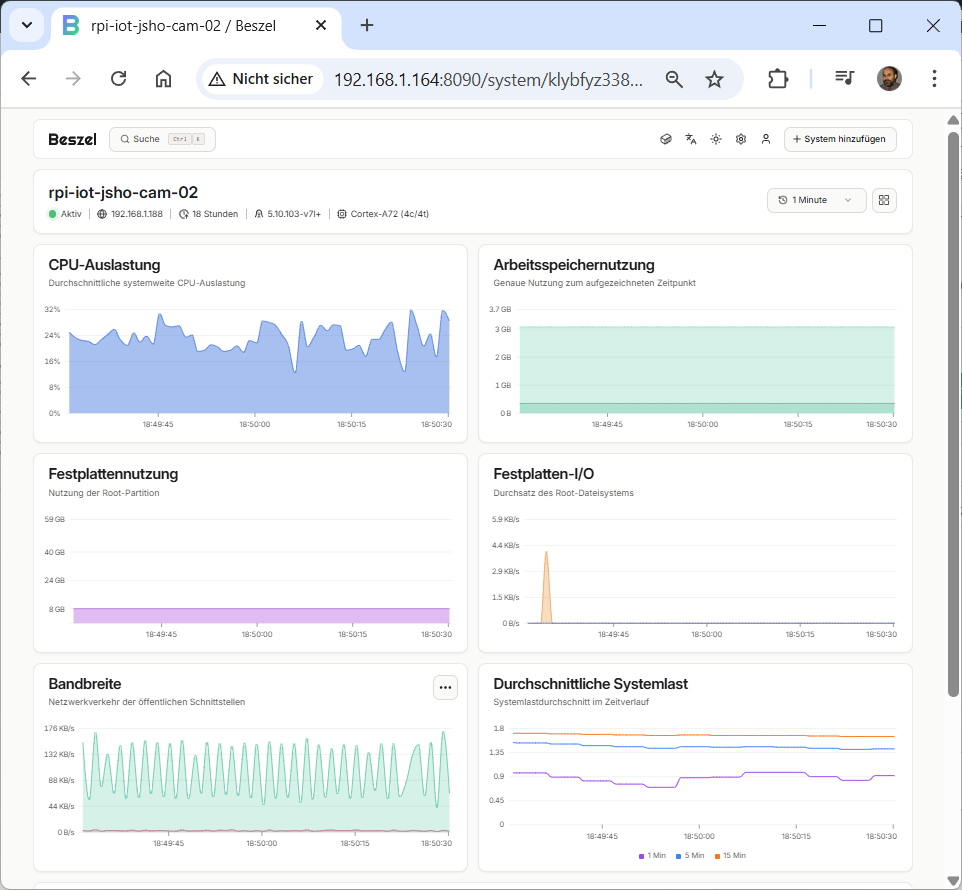
To uninstall the Beszel agent run the installation script with the -u option
pi@rpi-NodeRed-01:~ $
pi@rpi-NodeRed-01:~ $ curl -sL https://get.beszel.dev -o /tmp/install-agent.sh && chmod +x /tmp/install-agent.sh && /tmp/install-agent.sh -u Stopping and disabling the agent service… Removed /etc/systemd/system/multi-user.target.wants/beszel-agent.service. Removing the systemd service file… Removing the daily update service and timer… Removing the Beszel Agent directory… Removing the dedicated user for the agent service… Beszel Agent has been uninstalled successfully!