Archive for the ‘Windows Server 2022’ Category
Microsoft Power BI Desktop – analyse the Windows ‚perfmon‘ log data to diagnose virtual machine performance issues
Samstag, Januar 8th, 2022Dieses Programm erstellt durch die Beispielsratenänderung und/oder die Dateiformatkonvertierung neue
Syntax:
Parameter:
Optionen:
Beispiele:
Microsoft Windows Server 2016 2019 2022 – Leistungsoptimierung für Netzwerkadapter
Freitag, Dezember 10th, 2021 Aktivieren der empfangsseitigen Skalierung (RECEIVE-Side Scaling, RSS) für Webserver
Wenn Receive Side Scaling (RSS) eingeschaltet ist wird die gesamte Empfangs Datenverarbeitung für eine bestimmte TCP Verbindung über mehrere Prozessoren oder Prozessorkerne hinweg freigegeben ohne RSS wird die gesamte Verarbeitung von einem einzelnen Prozessor durchgeführt was zu einer ineffizienten Systemcache Nutzung führt
Microsoft Windows Server 2016 – do not use the offload features IPsec Task Offload or TCP Chimney Offload because these technologies are deprecated and might adversely affect server and networking performance.
Freitag, Dezember 10th, 2021 In addition these technologies might not be supported by Microsoft in the future – Performance Tuning Network Adapters
C:\> netsh interface tcp show global
Querying active state…
TCP Global Parameters
—–
Receive-Side Scaling State : enabled
Chimney Offload State : disabled
Receive Window Auto-Tuning Level : normal
Add-On Congestion Control Provider : default
ECN Capability : disabled
RFC 1323 Timestamps : disabled
Initial RTO : 3000
Receive Segment Coalescing State : enabled
Non Sack Rtt Resiliency : disabled
Max SYN Retransmissions : 2
Fast Open : enabled
Fast Open Fallback : enabled
Pacing Profile : off
… and so it comes to the performance problems in the network of Microsoft Windows Server 2019
Microsoft Active Directory Migration – from Windows Server 2008 R2 to Windows Server 2022
Mittwoch, November 17th, 2021 Microsoft Windows Server 2008 and Windows Server 2008 R2 Operating system reached the end of their support cycle on the 14th of January 2020 because of this many organizations wanted to migrate away from these legacy operating systems. End-of-life operating systems have a direct impact on various industry compliances IT audits Penetration tests and so on even business does not have a business requirement to upgrade end of life operating system leaves no choice but to upgrade
Microsoft Windows Server 2022 – contains many features that are not present in Windows Server 2019
Samstag, November 13th, 2021- Latest secured-core server functionality
- Server Message Block (SMB) security enhancements
- SMB over QUIC
- DNS over HTTPS (DoH) client
- SMB Compression
- Storage Migration Service (SMS) latest features
- Container improvements
- Scalability improvements in overlay networking
- Direct Server Return (DSR) routing for overlay and l2bridge networks
- PowerShell scripting and automation improvements
- Added Nested Hyper-V virtualization for AMD EPYC and Ryzen processors
- Single node caching and tiering
- Scalability improvements
- Improved networking UDP/TCP performance
- Microsoft Edge Browser support
Microsoft Windows Server Remote Desktop Services (RDS) with Citrix Hypervisor (XenServer) – opted for 15 user per VM with a max of 18-20 in case of outage (hardware failure etc.) with specs of 6 vCPUs and 48 GB RAM
Donnerstag, September 23rd, 2021
Microsoft Windows Server 2022 – with Azure Network Adapter
Dienstag, September 21st, 2021The entire purpose of the Azure Network Adapter is to make it easy to interconnect specific Windows Servers with your Azure vNet traditionally there are several options organizations have for accomplishing this they could create a site-to-site VPN connection Azure Express Route or a Point-to-Site VPN connection
Microsoft Windows Server 2022 – install with Microsoft Deployment Tools (MDT)
Montag, September 13th, 2021Microsoft Windows Server 2022 – install with Microsoft Deployment Tools (MDT)
Microsoft Windows Server 2022 – another new feature is supported the Hyper-V nested virtualization for AMD processors
Freitag, September 10th, 2021Microsoft Windows Server 2022 – einige der neuen Features
Donnerstag, September 2nd, 2021Microsoft Windows Server 2022 – der Mainstream Support endet am 13. Oktober 2026 und der Long Term Support (LTS) ist bis zum 14. Oktober 2031 gegeben
Montag, August 23rd, 2021Microsoft Windows Server 2022 Long-Term Servicing Channel (LTSC) – General Availability (GA) 08/18/2021
Donnerstag, August 19th, 2021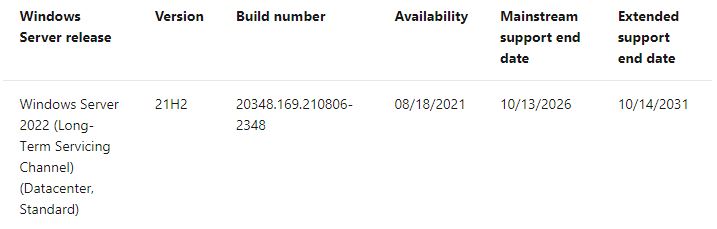
Microsoft Windows Server – künftig gibt es nur noch Long Term Servicing Channel (LTSC) Releases alle 2 bis 3 Jahre sogenannte Software Assurance Updates (SAC) Versionen erscheinen für die kommende Version 2022 nicht mehr
Mittwoch, Juli 28th, 2021Proxmox Virtual Environment (VE) 7.0-10 – no network adapter found in a fresh Windows Server installation
Samstag, Juli 24th, 2021The issues disappear when using the Q35 chipset hardware model
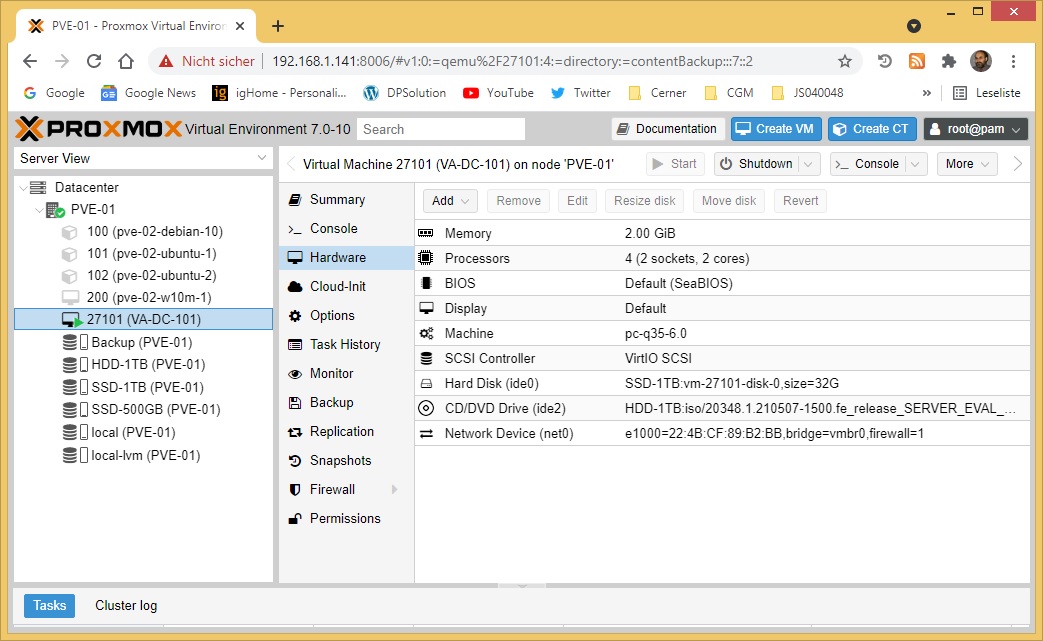
A VMs Machine Type defines the hardware layout of the VM’s virtual motherboard you can choose between the default Intel 440FX or the Q35 chipset which also provides a virtual PCIe bus and thus may be desired if one wants to pass through PCIe hardware