Archive for the ‘Windows 11’ Category
Microsoft Secure Boot certificates expire in June 2026 – what happens when the certificates expire
Dienstag, März 10th, 2026Microsoft Windows 11 – announcing Insider Preview Build 26300.7939 (Dev Channel)
Mittwoch, März 4th, 2026 Microsoft Windows 11 – starting with this release, administrators may enable a more secure mode for processing batch files that ensures they do not change during execution by adding a value to the registry key HKEY_LOCAL_MACHINE\Software\Microsoft\Command Processor named LockBatchFilesWhenInUse (DWORD value 0 or 1)
Microsoft Windows 11 – die Anforderungen zu umgehen ist nicht strafbar sondern ein Verstoß gegen die Nutzungsbedingungen von Microsoft
Montag, Februar 23rd, 2026Microsoft Secure Boot certificates expire in June 2026 – was replaced today
Mittwoch, Februar 18th, 2026
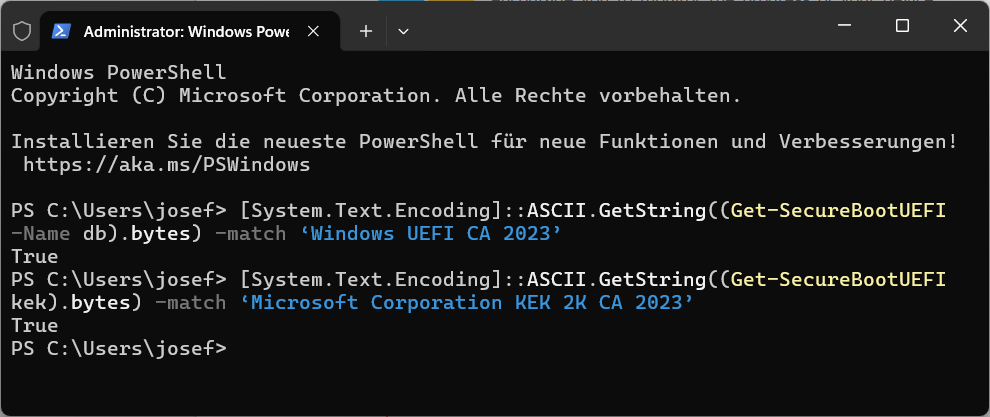
Microsoft Secure Boot certificates expire in June 2026 – what happens when the certificates expire
Donnerstag, Februar 12th, 2026Refreshing the root of trust: industry collaboration on Secure Boot certificate updates – if a device does not receive the new Secure Boot certificates before the 2011 certificates expire, the PC will continue to function normally, and existing software will keep running. However, the device will enter a degraded security state that limits its ability to receive future boot-level protections. As new boot‑level vulnerabilities are discovered, affected systems become increasingly exposed because they can no longer install new mitigations. Over time, this may also lead to compatibility issues, as newer operating systems, firmware, hardware or Secure Boot–dependent software may fail to load
Microsoft Windows 11 Version 23H2 – 2026-01 Kumulatives Update für x64-basierte Systeme (KB5077797) und korrigiert das Shutdown-/Sleep Problem
Sonntag, Januar 18th, 2026Microsoft Windows 11 – Smart App Control (SAC) verfolgt den Ansatz nur Programme und Dateien auszuführen welche aus Sicht von Microsoft vertrauenswürdig sind
Sonntag, Januar 18th, 2026Microsoft Windows 11 23H2 – Januar 2026 Update KB5073455 macht Shutdown-/Sleep Probleme
Freitag, Januar 16th, 2026Microsoft schlägt Workaround vor das System über die Eingabeaufforderung herunterzufahren dazu ist ‚cmd‘ in die Suchleiste einzugeben um eine Eingabeaufforderung zu öffnen im Fenster Eingabeaufforderung ist der folgende Befehl einzugeben und per Eingabetaste zu bestätigen
shutdown /s /t 0
Microsoft schreibt dass es derzeit keine Möglichkeit gibt den Ruhezustand zu aktivieren bis dieses Problem behoben ist sollen Nutzer ihre Arbeiten speichern und das System bei beendeter Arbeiter herunterfahren um zu vermeiden dass das Gerät in den Ruhezustand wechselt anstatt sich auszuschalten
Microsoft Windows 10 & 11 – Sicherheitswarnung beim Öffnen einer ausführbaren Datei von einem Netzlaufwerk
Montag, Dezember 29th, 2025