Archive for the ‘SQL Server’ Category
RedGate SQL Index Manager – lets you quickly and easily find out the status of your indexes and discover which databases need maintenance
Mittwoch, Januar 28th, 2026Veeam Backup & Replication 12 – Optimizing and Maintaining Microsoft SQL Server Instance Hosting Veeam Service Provider Console Configuration Database
Donnerstag, Dezember 25th, 2025 Veeam Backup & Replication – Microsoft SQL Server Index and data pages can experience internal fragmentation. Index and table structures can experience logical scan and extent scan fragmentation periodically check index fragmentation of the VSPC database
The most sensitive tables for index fragmentation are:
VeeamBP. ObjectEntityPropertyValue
VeeamOD. ObjectEntityPropertyValue
VeeamBP.ObjectEntity
VeeamOD.ObjectEntity
Rebuild vs Reorganize Indexes:
Please note that rebuilding indexes is a heavy task that can take a lot of time additionally online indexing can only be done with the Enterprise Edition of Microsoft SQL Server. In other editions of the SQL Server only offline indexing is available meaning tables having their indexes rebuilt will be locked during the rebuild operation. Reorganizing the index on the other hand is less heavy an operation and can be done online with all editions generally speaking reorganizing indexes is preferable to rebuilding when possible
SQL Server – Perform index operations online – Use SQL Server Management Studio
Microsoft SQL Server – optimize index maintenance to improve query performance and reduce resource consumption
Donnerstag, Dezember 4th, 2025 Microsoft SQL Server – optimize index maintenance to improve query performance and reduce resource consumption
SQL Server Index and Statistics Maintenance – ‚IndexOptimize‘ is the SQL Server Maintenance Solution’s stored procedure for rebuilding and reorganizing indexes and updating statistics
Define thresholds for a common guideline is to:
Reorganize indexes with 5% to 30% fragmentation
Rebuild indexes with greater than 30% fragmentation
If using SQL Server Enterprise Edition use the ONLINE=ON option for index rebuilds to allow the database to remain available during the operation minimizing downtime
Microsoft SQL Server 2025 – ist da
Montag, November 24th, 2025Microsoft SQL Server 2025 … die neue Version setzt auf bewährte Sicherheit Performance und hohe Verfügbarkeit und erweitert diese Basis erstmals um tief in die Datenbank integrierte KI Funktionen
Microsoft SQL Server – reduces the size of the backup and restore history tables by deleting the entries for backup sets older than the specified date
Sonntag, März 23rd, 2025Microsoft SQL Server – more rows are added to the backup and restore history tables after each backup or restore operation is performed therefore we recommend that you periodically execute sp_delete_backuphistory
The following example deletes all entries that are older than January 14, 2023, 12:00 A.M. in the backup and restore history tables
USE msdb;
GO
EXEC sp_delete_backuphistory @oldest_date = ‚2023-01-14‘;
GO
Microsoft SQL Server 2014 – End of Support (EOS) 09.07.2024 without Extended Security Updates (ESUs)
Donnerstag, Juni 20th, 2024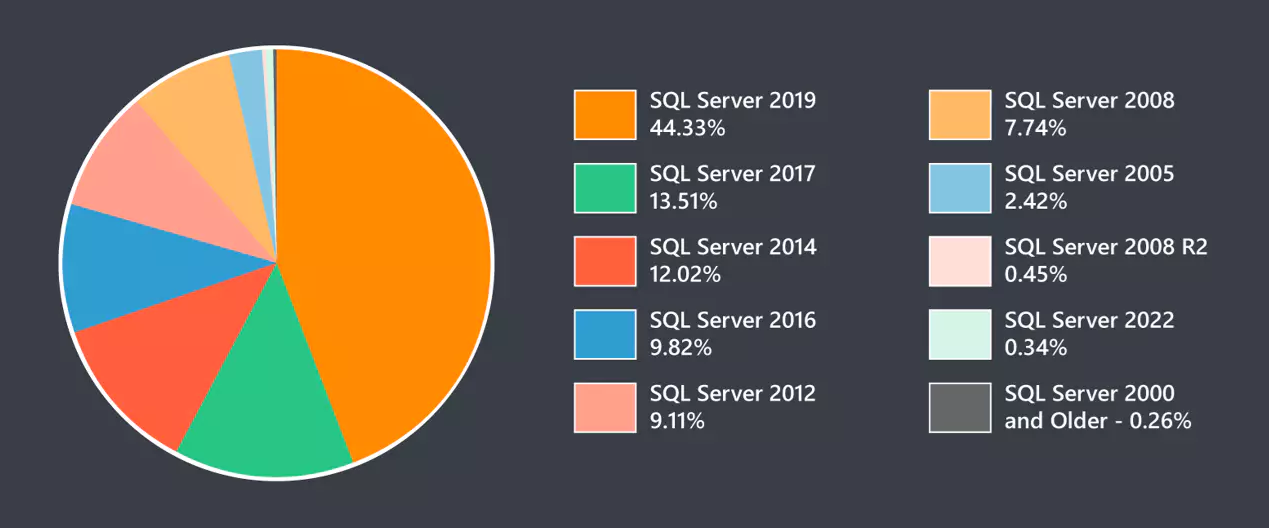
Microsoft SQL Server 2012 – Product Support Lifecycle Policy June 2023
Sonntag, Juni 25th, 2023
Microsoft SQL Server – export XML column rows from SQL table into individual files
Samstag, Mai 21st, 2022 Microsoft SQL Server – export XML column rows from SQL table into individual files
It is roughly formatted as such
+————–+——————+
| REFERENCE_ID | REFERENCE_XML |
+————–+——————+
| 1 | <xml>…</xml> |
| 2 | <xml>…</xml> |
| 3 | <xml>…</xml> |
| 4 | <xml>…</xml> |
| … | <xml>…</xml> |
| 70000 | <xml>…</xml> |
+————–+——————+
I would like to loop through every row and bulk export each REFERENCE_XML column and name it as the REFERENCE_ID
My output folder set would look as such
C:\References\1.xml
C:\References\2.xml
C:\References\3.xml
C:\References\4.xml
C:\References\…
C:\References\70000.xml
Microsoft SQL Server – Datenbank-/Tabellengrössen von jeder Datenbank einer Instanz
Donnerstag, April 14th, 2022Microsoft SQL Server Profiler – to capture an expensive query running on a SQL Server Instance using a Profiler Trace
Montag, Oktober 4th, 2021Microsoft SQL Server Profiler – is an interface to create and manage traces and analyze and replay trace results events are saved in a trace file that can later be analyzed or used to replay a specific series of steps when diagnosing a problem
SolarWinds Database Performance Analyzer – zeigt Leistungsprobleme auf und bietet Optimierungstipps von Experten
Mittwoch, August 11th, 2021Quest Foglight for SQL Server – diagnose and resolve database performance issues with monitoring software
Samstag, Juli 31st, 2021Quest Foglight for SQL Server – you can quickly diagnose and resolve SQL Server performance problems and optimize your workloads to prevent future issues. This SQL Server tuning tool includes real-time and historical diagnostics, reporting and more, so you can confidently ensure the health of your entire database environment
Quest Spotlight on SQL Server Enterprise – monitor and optimize SQL Server database performance from any device
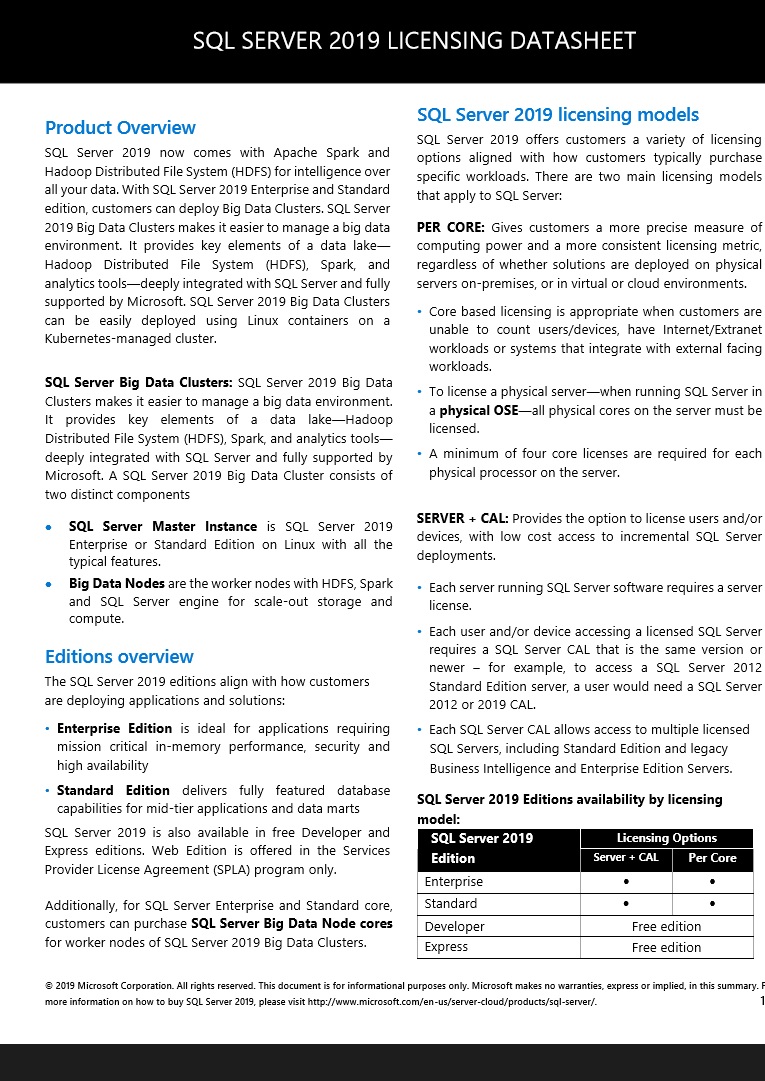
Samstag, Juli 31st, 2021Microsoft SQL Server 2019 – Licensing Datasheet
Mittwoch, Februar 3rd, 2021