
Archive for the ‘Microsoft Solution’ Category
Microsoft hat Updates für Internet Explorer (IE) und Windows freigegeben die Sicherheitslücken und Bugs beheben sollen – aber zu einigem Chaos und Problemen führen
Sonntag, Oktober 6th, 2019Microsoft Office 365 Single Sign-On (E20) – follow these steps to configure Mattermost to use your Office 365 logon credentials and Azure Active Directory account as a single sign-on (SSO) service for team creation, account creation and sign-in
Samstag, Oktober 5th, 2019
 Microsoft Office 365 Single Sign-On (E20) – the system must be using SSL for use with Office365 as Microsoft only allows OAuth redirect URIs that are SSL enabled
Microsoft PowerPoint – rotate or flip an object
Samstag, Oktober 5th, 2019Microsoft Native Image Generator (NGen) – ein Tool zur Leistungsoptimierung von .NET Anwendungen
Samstag, Oktober 5th, 2019Microsoft Native Image Generator (NGen) – sobald systemeigene Images im Cache installiert wurden können sie mit „NGen“ angezeigt werden
C:\Windows\Microsoft.NET\Framework\v4.0.30319\NGen.exe display /verbose
C:\NotePad.exe C:\Windows\Microsoft.NET\Framework\v4.0.30319\NGen.log
damit werden zuerst alle Microsoft Assemblys und dann alle systemeigenen Images auf dem Computer aufgelistet
Microsoft Power BI Desktop – tips and tricks that you should add to your dashboards and reports
Freitag, Oktober 4th, 2019Microsoft Windows 10 – the latest Insider Preview builds includes a new Cloud download feature, which will help you to reset and reinstall your Windows 10 machine from the cloud
Freitag, Oktober 4th, 2019Microsoft Visual Studio Tools for Office Runtime (VSTO) – a silent installation is required to run Microsoft Office based solutions built using Microsoft Visual Studio 2010, 2012, 2013 and 2015
Donnerstag, Oktober 3rd, 2019Run following command
C:\> vstor_redist.exe /q /norestart
/q: silent install with no user interface
/norestart: suppresses any reboot prompt along-with hard reboot itself
Microsoft Surface Duo – is a new dual screen device that fits in your pocket
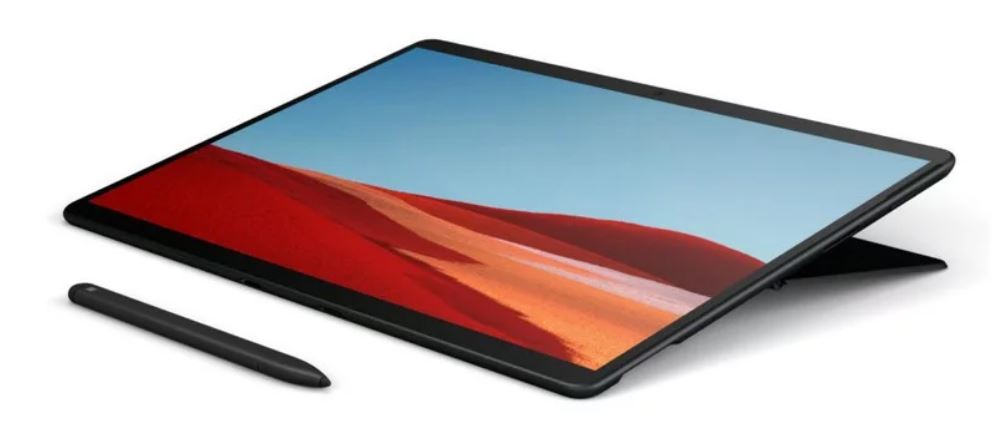
Mittwoch, Oktober 2nd, 2019Microsoft Surface Pro X – is thin stylish and runs a custom Microsoft SQ1 mobile chip
Mittwoch, Oktober 2nd, 2019Microsoft Surface Pro X – sleek design and ultimate mobility combine with razor-thin bezels that take your ideas to the edge of the brilliant 13” touchscreen work more efficiently anywhere with blazing-fast LTE
Microsoft OneDrive Personal Vault – is a protected area in OneDrive that can only be accessed with identity verification, such as your fingerprint, face, PIN, or a code sent to you via email or SMS
Dienstag, Oktober 1st, 2019Microsoft Native Image Generator (NGen) – how to enable assembly bind failure logging (Fusion) in .NET
Dienstag, Oktober 1st, 2019To enable assembly bind failure logging set the registry value
HKLM\Software\Microsoft\Fusion
DWORD EnableLog set value to 1
DWORD ForceLog set value to 1
DWORD LogFailures set value to 1
DWORD LogResourceBinds set value to 1
HKEY_LOCAL_MACHINE\SOFTWARE\Microsoft\.NETFramework
DWORD NGenLogVerbosity set value to 3
Microsoft Windows Virtual Desktop (WVD) – including full featured native client support for Windows Mac iOS and Android as well as new HTML5 support so you can access remote desktops and apps for almost any modern browser
Dienstag, Oktober 1st, 2019Microsoft Native Image Generator (NGen) – installing updates for the Microsoft .NET Framework 4 can take longer than expected in some scenarios
Montag, September 30th, 2019Forcing NGen.exe – to generate new Native Images without regard for what was previously generated
C:\Windows\Microsoft.NET\Framework\v4.0.30319\ngen.exe update /force /queue

C:\Windows\Microsoft.NET\Framework\v4.0.30319\NGen.log
09/30/2019 11:30:56.983 [6364]: NGen Task starting, command line: „C:\Windows\Microsoft.NET\Framework\v4.0.30319\NGenTask.exe“ /RuntimeWide /StopEvent:976
09/30/2019 11:30:57.029 [6364]: Attempting to acquire task lock.
09/30/2019 11:30:57.029 [6364]: Acquired task lock.
09/30/2019 11:30:57.061 [3068]: Command line: C:\Windows\Microsoft.NET\Framework\v4.0.30319\ngen.exe RemoveTaskDelayStartTrigger /LegacyServiceBehavior
09/30/2019 11:30:57.076 [3068]: ngen returning 0x00000000
09/30/2019 11:30:57.076 [6364]: Executing normal maintenance tasks
09/30/2019 11:30:57.154 [8032]: Command line: C:\Windows\Microsoft.NET\Framework\v4.0.30319\ngen.exe ExecuteQueuedItems /LegacyServiceBehavior
09/30/2019 11:30:57.248 [8032]: All compilation targets are up to date.
09/30/2019 11:30:57.248 [8032]: ngen returning 0x00000000
09/30/2019 11:30:58.233 [7088]: NGen Task starting, command line: „C:\Windows\Microsoft.NET\Framework\v4.0.30319\NGenTask.exe“ /RuntimeWide /StopEvent:1000
09/30/2019 11:30:58.248 [7088]: Attempting to acquire task lock.
09/30/2019 11:30:58.248 [7088]: Acquired task lock.
09/30/2019 11:30:58.295 [7392]: Command line: C:\Windows\Microsoft.NET\Framework\v4.0.30319\ngen.exe RemoveTaskDelayStartTrigger /LegacyServiceBehavior
09/30/2019 11:30:58.311 [7392]: ngen returning 0x00000000
09/30/2019 11:30:58.311 [7088]: Executing normal maintenance tasks
09/30/2019 11:30:58.342 [4596]: Command line: C:\Windows\Microsoft.NET\Framework\v4.0.30319\ngen.exe ExecuteQueuedItems /LegacyServiceBehavior
09/30/2019 11:30:58.483 [4596]: All compilation targets are up to date.
09/30/2019 11:30:58.483 [4596]: ngen returning 0x00000000
Microsoft Native Image Generator (NGen) – fails complaining that ‚NGen cannot proceed because Mscorlib.dll does not have a native image‘
Montag, September 30th, 2019NGen error because „Mscorlib.dll does not have a native image“ (x64 only, .NET 4.0 only)
This is unhealthy. The ngen-ed image of mscorlib.dll should have been created when .NET was installed on your machine. It is located in – C:\windows\assembly\NativeImages_v4.0.30319_64\
mscorlib\ab0a8fc3d086a3aaf942f366a12a9185\mscorlib.ni.dll – you cannot see this file with Windows Explorer you must use the command prompt. Go check to see if it there something went seriously wrong when .NET was installed if it is missing. The „.NET Runtime Optimization Service“ is the one that gets that job done make sure you didn’t disable it