Archive for the ‘Microsoft Solution’ Category
Microsoft Office 365 – ab sofort aus den neuen deutschen Cloud Rechenzentrumsregionen verfügbar
Freitag, Februar 21st, 2020Microsoft Office 365 – the new mobile app designed to be your go-to app for getting work done on a mobile device
Mittwoch, Februar 19th, 2020Microsoft Windows 10 – den Zugang zu Admin besser schützen
Freitag, Februar 14th, 2020Microsoft Round Robin DNS – provides limited load balancing
Donnerstag, Februar 13th, 2020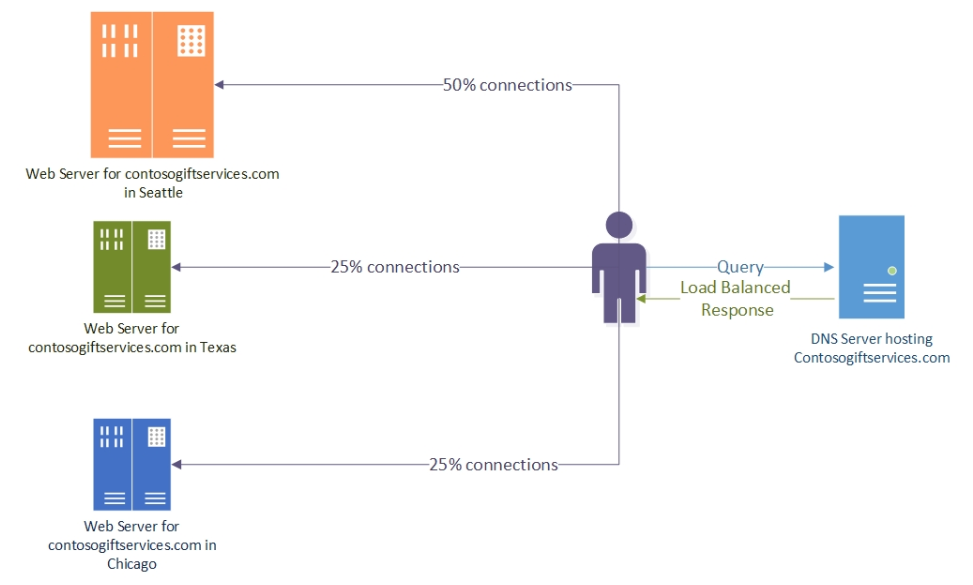
You can mitigate the effect of this behavior by using a low Time-to-Live (TTL) value for the DNS records that should be load balanced
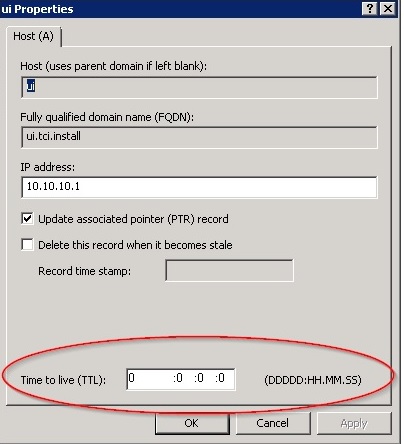
How to Configure DNS Aging and Scavenging (Cleanup Stale DNS Records)
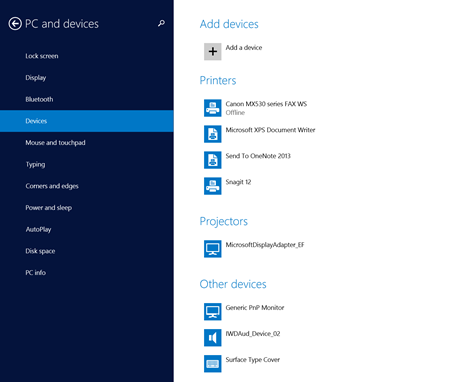
Microsoft Windows 8.1 – install the Microsoft Wireless Adapter on your device
Montag, Februar 10th, 2020 Microsoft Windows 8.1 – detects the devices that are available for installation. The Microsoft Wireless Display Adapter is listed as MicrosoftDisplayAdapter_EF
Microsoft Power BI Desktop – best practices in visualization creation
Samstag, Februar 8th, 2020Microsoft Windows 10 – Product Support Lifecycle Policy January 2020
Mittwoch, Februar 5th, 2020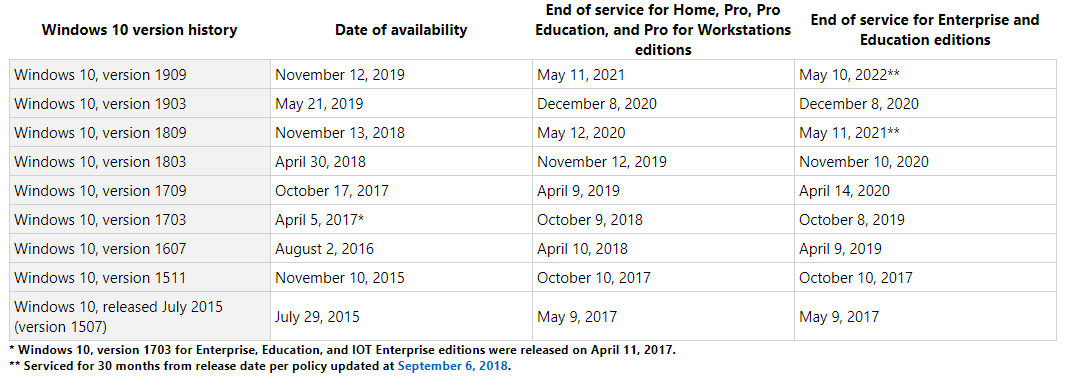
Microsoft Windows 10 – actually settings telemetry option to „0 – Security“ only works on Windows 10 Enterprise including LTSB/LTSC, Education, IoT and Server Editions
Dienstag, Februar 4th, 2020
Microsoft Teams – der Softwareriese vergaß ein Zertifikat zu erneuern
Montag, Februar 3rd, 2020
Microsoft 365 – update for January 2020
Freitag, Januar 31st, 2020Microsoft Windows 7 SP1 – trotz dem Supportende gibt es doch noch einen Update
Mittwoch, Januar 29th, 2020
Microsoft Office 365 – zwei neue Datacenter in Frankfurt/Berlin für deutsche Kunden nehmen Fahrt auf
Samstag, Januar 25th, 2020Microosoft Surface Neo – a groundbreaking new dual-screen device that redefines how you get things done with two 9” screens, a revolutionary 360° hinge, touch, pen, keyboard, and incredible new Windows experiences
Freitag, Januar 24th, 2020Microsoft Native Image Generator (NGen) – disable the use of all NGen images
Freitag, Januar 24th, 20201. Set the environment variable COMPLUS_ZAPDISABLE=1 or the registry key HKLM\SOFTWARE\Microsoft\.NETFramework\ZapDisable
This parameter will disable loading of native images – if you set this system wide your application will start much slower but all of your code will be JITed now
2. Create a file in C:\Windows\Microsoft.NET\assembly
\GAC_32\mscorlib\v4.0_4.0.0.0__b77a5c561934e089\mscorlib.ini with the content
[.NET Framework Debugging Control]
GenerateTrackingInfo=1
AllowOptimize=0
This will disable JIT optimizations for a given dll where the ini file must be named for an assembly <name>.dll like <name>.ini – you need to do this for each assembly you want to disable JIT optimizations
Microsoft Windows 10 – hat einen versteckten „Gott-Modus“
Donnerstag, Januar 23rd, 2020