Archive for the ‘Microsoft Solution’ Category
Microsoft Secure Boot certificates expire in June 2026 – what happens when the certificates expire
Dienstag, März 10th, 2026Microsoft Windows 11 – announcing Insider Preview Build 26300.7939 (Dev Channel)
Mittwoch, März 4th, 2026 Microsoft Windows 11 – starting with this release, administrators may enable a more secure mode for processing batch files that ensures they do not change during execution by adding a value to the registry key HKEY_LOCAL_MACHINE\Software\Microsoft\Command Processor named LockBatchFilesWhenInUse (DWORD value 0 or 1)
Microsoft 365 Local General Availability – local infrastructure and how it helps organizations meet sovereignty requirements while maintaining productivity in a private cloud environment
Donnerstag, Februar 26th, 2026Microsoft Secure Boot certificates expire in June 2026 – a Secure Boot playbook
Mittwoch, Februar 25th, 2026
Microsoft Windows 11 – die Anforderungen zu umgehen ist nicht strafbar sondern ein Verstoß gegen die Nutzungsbedingungen von Microsoft
Montag, Februar 23rd, 2026Microsoft Windows Server 2016 – an Extended Security Update (ESU) is coming
Sonntag, Februar 22nd, 2026Microsoft .NET 11 – Next version of Microsoft’s software development platform brings improvements for JIT compilation WebAssembly C# and F#
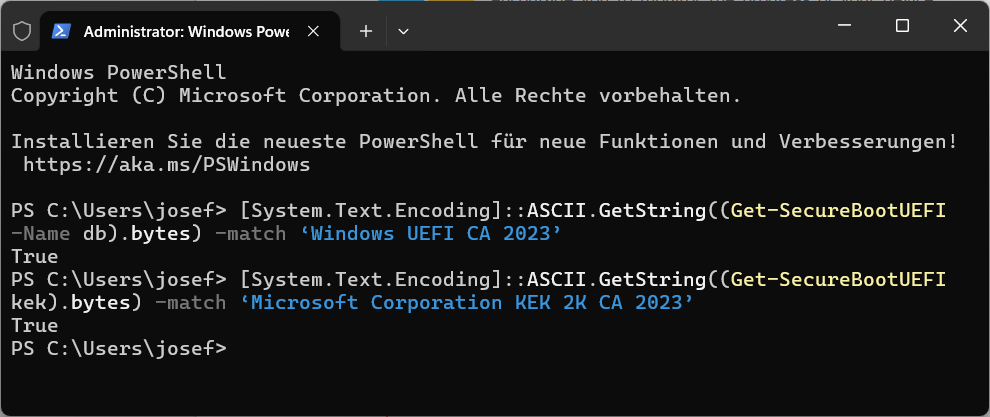
Mittwoch, Februar 18th, 2026Microsoft Secure Boot certificates expire in June 2026 – was replaced today
Mittwoch, Februar 18th, 2026
Trend Micro (Apex One) – blockt URLs vom Microsoft Windows Update Service
Freitag, Februar 13th, 2026Thomas-Krenn.AG – Microsoft SQL Server 2025 Editionen und Lizenzierung
Freitag, Februar 13th, 2026Microsoft Secure Boot certificates expire in June 2026 – what happens when the certificates expire
Donnerstag, Februar 12th, 2026Refreshing the root of trust: industry collaboration on Secure Boot certificate updates – if a device does not receive the new Secure Boot certificates before the 2011 certificates expire, the PC will continue to function normally, and existing software will keep running. However, the device will enter a degraded security state that limits its ability to receive future boot-level protections. As new boot‑level vulnerabilities are discovered, affected systems become increasingly exposed because they can no longer install new mitigations. Over time, this may also lead to compatibility issues, as newer operating systems, firmware, hardware or Secure Boot–dependent software may fail to load