Archive for Juli, 2024
Retrieval Augmented Generation (RAG) in der Anwendung mit einem Large Language Model (LLM) #2
Sonntag, Juli 7th, 2024Proxmox Virtual Environment (VE) 8.2.4 – how to use your first local ‚Meta Llama 3‘ Large Language Model (LLM) project with Open WebUI and now with AnythingLLM (with a Chroma Vector Database) used as a Retrieval Augmented Generation (RAG) system
Sonntag, Juli 7th, 2024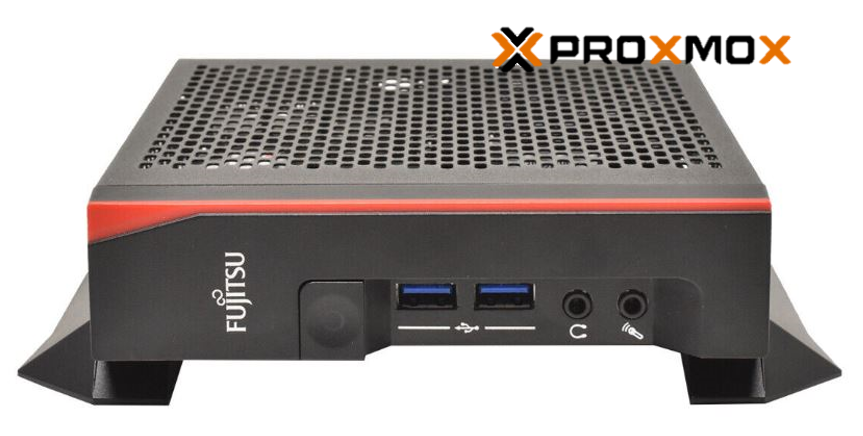
root@pve-ai-llm-02:~# git clone https://github.com/chroma-core/chroma && cd chroma
Cloning into ‚chroma’…
remote: Enumerating objects: 39779, done.
remote: Counting objects: 100% (7798/7798), done.
remote: Compressing objects: 100% (1362/1362), done.
remote: Total 39779 (delta 6967), reused 6802 (delta 6356), pack-reused 31981
Receiving objects: 100% (39779/39779), 320.34 MiB | 11.29 MiB/s, done.
Resolving deltas: 100% (25736/25736), done.
root@pve-ai-llm-02:~/chroma#
root@pve-ai-llm-02:~/chroma# docker compose up -d –build
WARN[0000] The „CHROMA_SERVER_AUTHN_PROVIDER“ variable is not set. Defaulting to a blank string.
WARN[0000] The „CHROMA_SERVER_AUTHN_CREDENTIALS_FILE“ variable is not set. Defaulting to a blank string.
WARN[0000] The „CHROMA_SERVER_AUTHN_CREDENTIALS“ variable is not set. Defaulting to a blank string.
WARN[0000] The „CHROMA_AUTH_TOKEN_TRANSPORT_HEADER“ variable is not set. Defaulting to a blank string.
WARN[0000] The „CHROMA_OTEL_EXPORTER_ENDPOINT“ variable is not set. Defaulting to a blank string.
WARN[0000] The „CHROMA_OTEL_EXPORTER_HEADERS“ variable is not set. Defaulting to a blank string.
WARN[0000] The „CHROMA_OTEL_SERVICE_NAME“ variable is not set. Defaulting to a blank string.
WARN[0000] The „CHROMA_OTEL_GRANULARITY“ variable is not set. Defaulting to a blank string.
WARN[0000] The „CHROMA_SERVER_NOFILE“ variable is not set. Defaulting to a blank string.
WARN[0000] /root/chroma/docker-compose.yml: `version` is obsolete
[+] Building 100.1s (17/17) FINISHED
=> [server internal] load build definition from Dockerfile
=> => transferring dockerfile: 1.32kB
=> [server internal] load metadata for docker.io/library/python:3.11-slim-bookworm
=> [server internal] load .dockerignore
=> => transferring context: 131B
=> [server builder 1/6] FROM docker.io/library/python:3.11-slim-bookworm@sha256:aad3c9cb248194ddd1b98860c2bf41ea7239c384ed51829cf38dcb3569deb7f1
=> => resolve docker.io/library/python:3.11-slim-bookworm@sha256:aad3c9cb248194ddd1b98860c2bf41ea7239c384ed51829cf38dcb3569deb7f1
=> => sha256:642b83290b5254bbe4bf72ee85b86b3496689d263e237b379039bced52fe358d 1.94kB / 1.94kB
=> => sha256:c8413a70b2b7bf9cc5c0d240b06d5bc61add901ecaf2d5621dbce4bcb18875d0 6.89kB / 6.89kB
=> => sha256:f11c1adaa26e078479ccdd45312ea3b88476441b91be0ec898a7e07bfd05badc 29.13MB / 29.13MB
=> => sha256:c1ffa773372df0248c21b3d0965cc0197074d66e5ca8d6e23d6fcdd43a39ab45 3.51MB / 3.51MB
=> => sha256:bb03a6d9f5bc4d62b6c0fe02b885a4bdf44b5661ff5d3a3112bac4f16c8e0fe4 12.87MB / 12.87MB
=> => sha256:aad3c9cb248194ddd1b98860c2bf41ea7239c384ed51829cf38dcb3569deb7f1 9.12kB / 9.12kB
=> => sha256:3012e1cab3ddadfb1f5886d260c06da74fc1cb0bf8ca660ec2306ac9ce87fc8c 231B / 231B
=> => sha256:293c7f22380c8fd647d1dc801d163d33cf597052de2b5b0e13b72a1843b9c0cc 3.21MB / 3.21MB
=> => extracting sha256:f11c1adaa26e078479ccdd45312ea3b88476441b91be0ec898a7e07bfd05badc
=> => extracting sha256:c1ffa773372df0248c21b3d0965cc0197074d66e5ca8d6e23d6fcdd43a39ab45
=> => extracting sha256:bb03a6d9f5bc4d62b6c0fe02b885a4bdf44b5661ff5d3a3112bac4f16c8e0fe4
=> => extracting sha256:3012e1cab3ddadfb1f5886d260c06da74fc1cb0bf8ca660ec2306ac9ce87fc8c
=> => extracting sha256:293c7f22380c8fd647d1dc801d163d33cf597052de2b5b0e13b72a1843b9c0cc
=> [server internal] load build context
=> => transferring context: 29.42MB
=> [server final 2/7] RUN mkdir /chroma
=> [server builder 2/6] RUN apt-get update –fix-missing && apt-get install -y –fix-missing build-essential gcc g++ cmake autoconf && r
=> [server final 3/7] WORKDIR /chroma
=> [server builder 3/6] WORKDIR /install
=> [server builder 4/6] COPY ./requirements.txt requirements.txt
=> [server builder 5/6] RUN pip install –no-cache-dir –upgrade –prefix=“/install“ -r requirements.txt
=> [server builder 6/6] RUN if [ „$REBUILD_HNSWLIB“ = „true“ ]; then pip install –no-binary :all: –force-reinstall –no-cache-dir –prefix=“/install“ chroma-h
=> [server final 4/7] COPY –from=builder /install /usr/local
=> [server final 5/7] COPY ./bin/docker_entrypoint.sh /docker_entrypoint.sh
=> [server final 6/7] COPY ./ /chroma
=> [server final 7/7] RUN apt-get update –fix-missing && apt-get install -y curl && chmod +x /docker_entrypoint.sh && rm -rf /var/lib/apt/lists/*
=> [server] exporting to image
=> => exporting layers
=> => writing image sha256:eee7257aeb16c8cb97561de427f1f7265f37e7f706f066cc0147f775abc68d15
=> => naming to docker.io/library/server
[+] Running 3/3
✔ Network chroma_net Created
✔ Volume „chroma_chroma-data“ Created
✔ Container chroma-server-1 Started
root@pve-ai-llm-02:~#
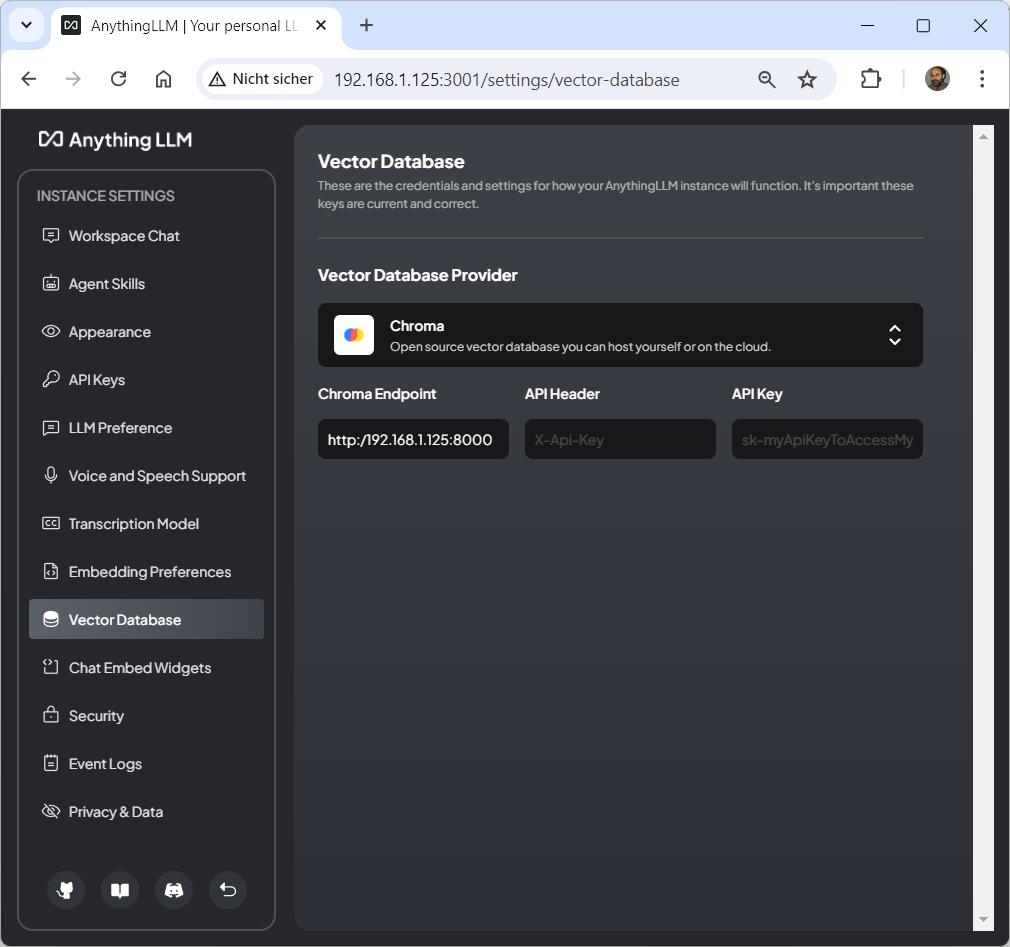
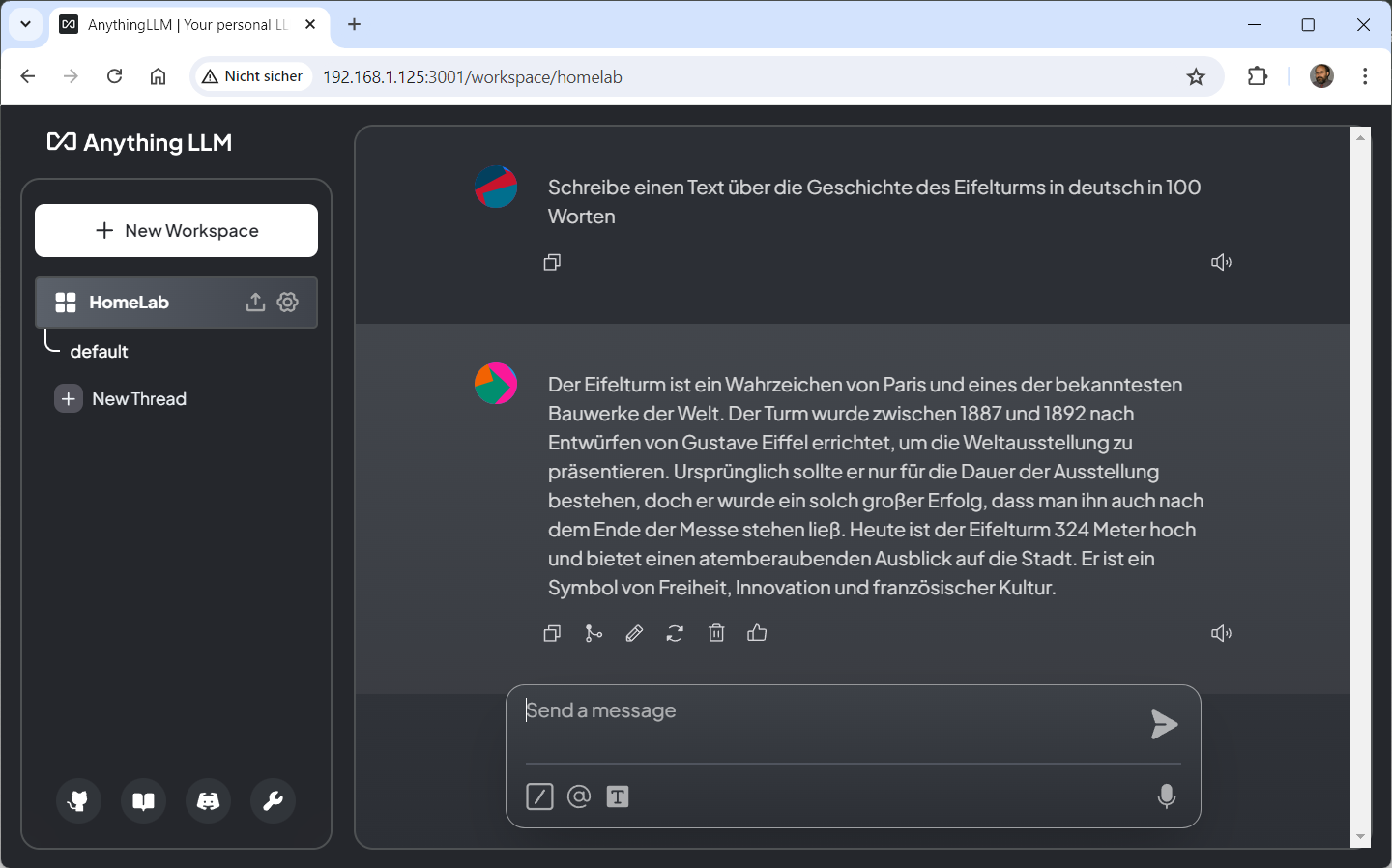
## AnythingLLM WEB Desktop for Linux aufrufen ##
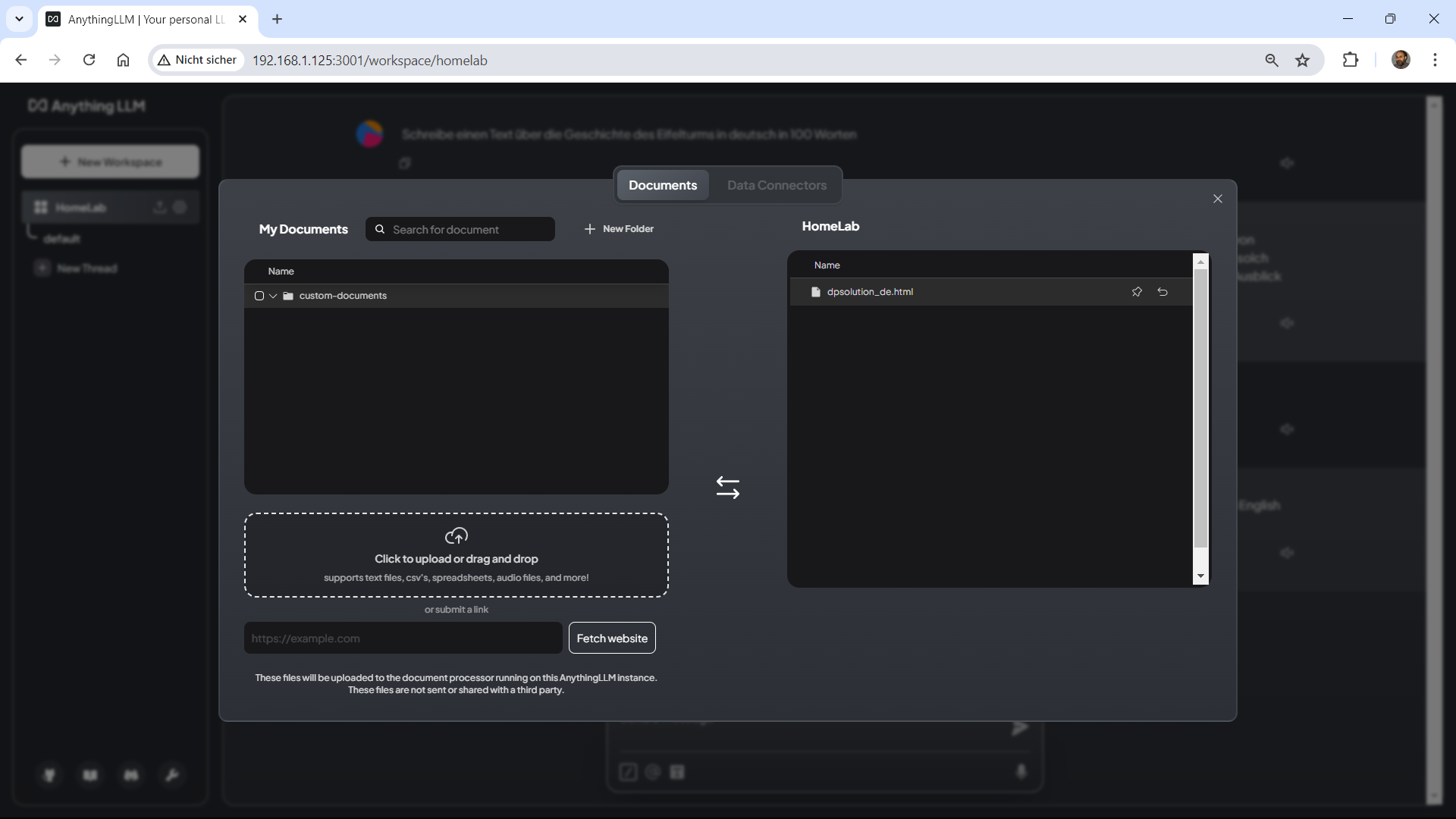
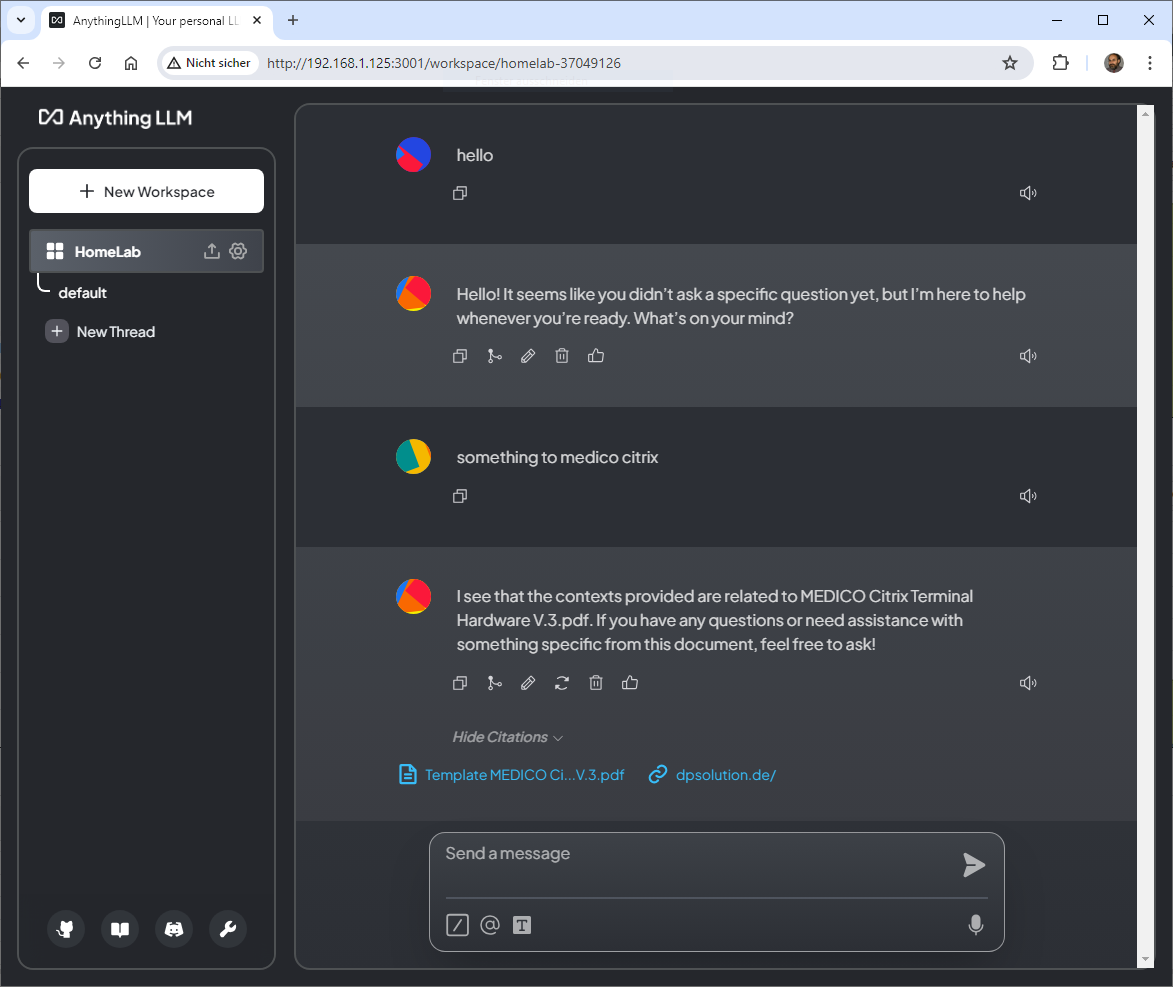
Chroma – the AI native open source embedding vector database
Sonntag, Juli 7th, 2024Sonntag, Juli 7th, 2024
Cyberabwehr muss geübt werden – wie eine Brandschutzübung! So unsere Präsidentin Claudia Plattner im Interview mit @sternde. Mehr dazu, über Hackerangriffe auf die EM und Desinformationskampagnen in der aktuellen Printausgabe oder online (Paywall ): https://t.co/Z3OWTTkUgO pic.twitter.com/ziSBIxGYX9
— BSI (@BSI_Bund) July 7, 2024
Proxmox Backup Server 2.4-7 – update with No Subscription Repository
Sonntag, Juli 7th, 2024root@PVE-BACKUP:~# vi /etc/apt/sources.list.d/pbs-enterprise.list
# deb https://enterprise.proxmox.com/debian/pbs bullseye pbs-enterprise
deb http://download.proxmox.com/debian/pbs bullseye pbs-no-subscription
root@PVE-BACKUP:~# apt-get update && apt-get dist-upgrade
Maxfree S6 15.6″ – the ultimate triple monitor for laptop boosting productivity
Sonntag, Juli 7th, 2024Richard Baldwin Professor of International Economics at IMD Business School in Lausanne – nicht Künstliche Intelligenz (KI) wird euch eure Stelle wegnehmen sondern jemand der weiß wie man sie nutzt
Sonntag, Juli 7th, 2024Motorcycle touring in Europe – best motorcycle roads in France D902 (Platriére Pass)
Sonntag, Juli 7th, 2024Artificial Intelligence (AI) – has the ability to revolutionise and personalise targeted healthcare for individual patients
Sonntag, Juli 7th, 2024Hawaii Mauna Kea Subaru Telescope 4.163m – online webcam
Samstag, Juli 6th, 2024Proxmox Virtual Environment (VE) 8.2.4 – how to use your first local ‚Meta Llama 3‘ Large Language Model (LLM) project without the need for a GPU and now with Open WebUI and AnythingLLM
Samstag, Juli 6th, 2024The AnythingLLM is installed in Ubuntu server
In the system LLM set the system can connect to the Ollama server and get the models
But when chat in workspace the docker is exited
Show the info in browser
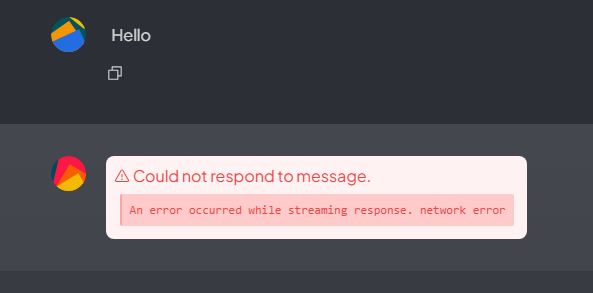
… and the docker logs
„/usr/local/bin/docker-entrypoint.sh: line 7: 115 Illegal instruction (core dumped) node /app/server/index.js“
What’s the problem?
How can I determine if my CPU supports AVX instructions?
root@pve-ai-llm-02:~# cat /proc/cpuinfo | grep -i avx2
root@pve-ai-llm-02:~#
AVX2 is not supported!
root@pve-ai-llm-02:~# docker ps
CONTAINER ID IMAGE COMMAND CREATED STATUS PORTS NAMES
d605cf5074a5 mintplexlabs/anythingllm „/bin/bash /usr/loca…“ 5 hours ago Up 19 seconds (healthy) 0.0.0.0:3001->3001/tcp, :::3001->3001/tcp AnythingLLM
root@pve-ai-llm-02:~# docker container logs d605cf5074a5
[collector] info: Collector hot directory and tmp storage wiped!
[collector] info: Document processor app listening on port 8888
Environment variables loaded from .env
Prisma schema loaded from prisma/schema.prisma
✔ Generated Prisma Client (v5.3.1) to ./node_modules/@prisma/client in 391ms
Start using Prisma Client in Node.js (See: https://pris.ly/d/client)
„`
import { PrismaClient } from ‚@prisma/client‘
const prisma = new PrismaClient()
„`
or start using Prisma Client at the edge (See: https://pris.ly/d/accelerate)
„`
import { PrismaClient } from ‚@prisma/client/edge‘
const prisma = new PrismaClient()
„`
See other ways of importing Prisma Client: http://pris.ly/d/importing-client
Environment variables loaded from .env
Prisma schema loaded from prisma/schema.prisma
Datasource „db“: SQLite database „anythingllm.db“ at „file:../storage/anythingllm.db“
21 migrations found in prisma/migrations
No pending migrations to apply.
┌─────────────────────────────────────────────────────────┐
│ Update available 5.3.1 -> 5.16.1 │
│ Run the following to update │
│ npm i –save-dev prisma@latest │
│ npm i @prisma/client@latest │
└─────────────────────────────────────────────────────────┘
[backend] info: [TELEMETRY ENABLED] Anonymous Telemetry enabled. Telemetry helps Mintplex Labs Inc improve AnythingLLM.
[backend] info: prisma:info
[backend] info: [TELEMETRY SENT]
[backend] info: [CommunicationKey] RSA key pair generated for signed payloads within AnythingLLM services.
[backend] info: [EncryptionManager] Self-assigning key & salt for encrypting arbitrary data.
[backend] info: Primary server in HTTP mode listening on port 3001
[backend] info: [BackgroundWorkerService] Feature is not enabled and will not be started.
[backend] error: undefined
[backend] error: undefined
[backend] error: undefined
[backend] error: undefined
[backend] info: [Event Logged] – update_llm_provider
[backend] info: [Event Logged] – update_embedding_engine
[backend] info: [Event Logged] – update_vector_db
[backend] info: [TELEMETRY SENT]
[backend] info: [Event Logged] – workspace_created
[backend] info: [TELEMETRY SENT]
[backend] info: [NativeEmbedder] Initialized
[backend] info: [NativeEmbedder] Initialized
/usr/local/bin/docker-entrypoint.sh: line 7: 107 Illegal instruction (core dumped) node /app/server/index.js
[collector] info: Collector hot directory and tmp storage wiped!
[collector] info: Document processor app listening on port 8888
Environment variables loaded from .env
Prisma schema loaded from prisma/schema.prisma
✔ Generated Prisma Client (v5.3.1) to ./node_modules/@prisma/client in 386ms
Start using Prisma Client in Node.js (See: https://pris.ly/d/client)
„`
import { PrismaClient } from ‚@prisma/client‘
const prisma = new PrismaClient()
„`
or start using Prisma Client at the edge (See: https://pris.ly/d/accelerate)
„`
import { PrismaClient } from ‚@prisma/client/edge‘
const prisma = new PrismaClient()
„`
See other ways of importing Prisma Client: http://pris.ly/d/importing-client
Environment variables loaded from .env
Prisma schema loaded from prisma/schema.prisma
Datasource „db“: SQLite database „anythingllm.db“ at „file:../storage/anythingllm.db“
21 migrations found in prisma/migrations
No pending migrations to apply.
[backend] info: [TELEMETRY ENABLED] Anonymous Telemetry enabled. Telemetry helps Mintplex Labs Inc improve AnythingLLM.
[backend] info: prisma:info
[backend] info: [TELEMETRY SENT]
[backend] info: [CommunicationKey] RSA key pair generated for signed payloads within AnythingLLM services.
[backend] info: [EncryptionManager] Loaded existing key & salt for encrypting arbitrary data.
[backend] info: Primary server in HTTP mode listening on port 3001
[backend] info: [BackgroundWorkerService] Feature is not enabled and will not be started.
root@pve-ai-llm-02:~#
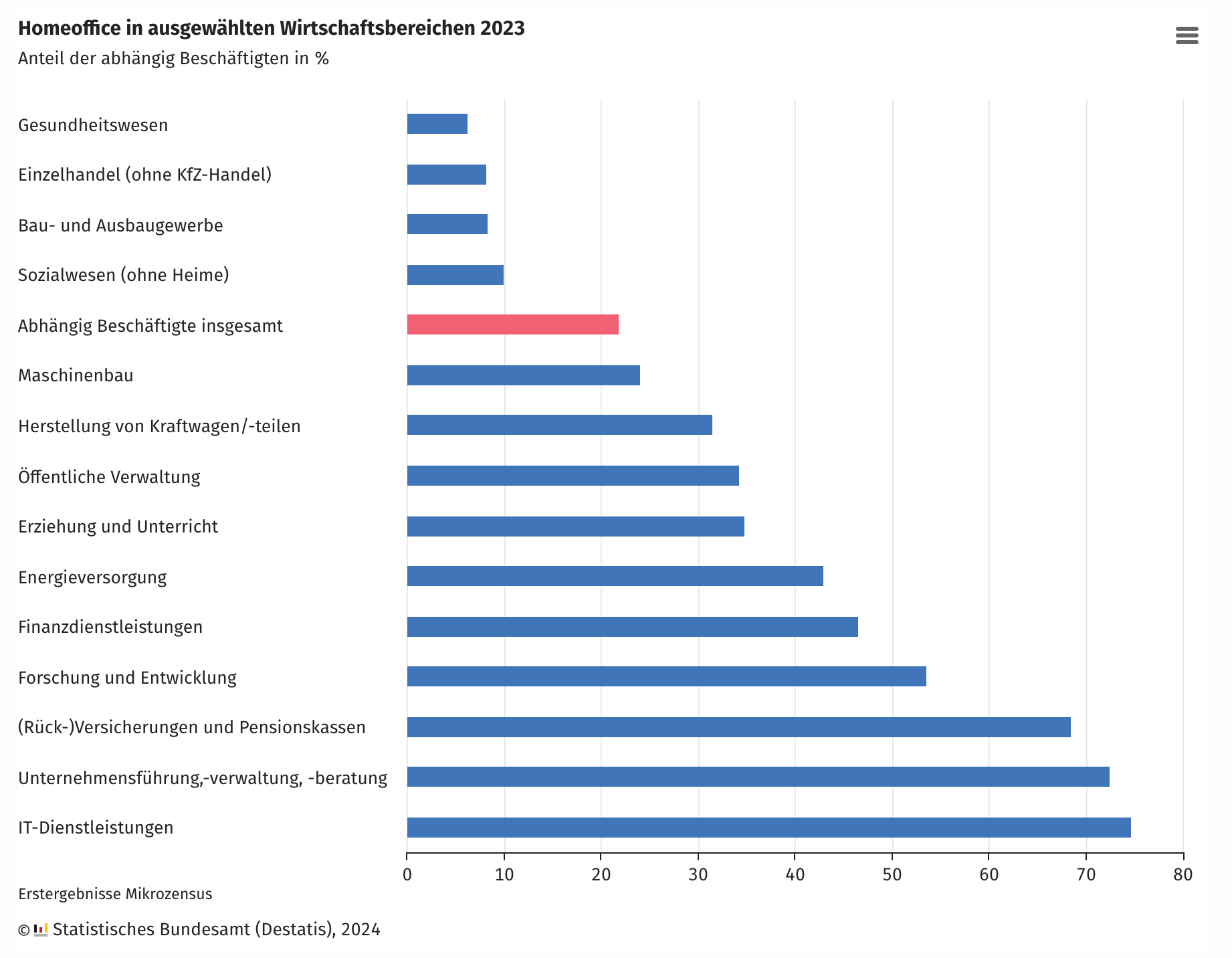
Statistische Bundesamt (Destatis) – Home Office 2023 je nach Branche gibt es Unterschiede
Samstag, Juli 6th, 2024