HPE_VM_Essentials_SW_image_v9.0.0_S5Q83-11075
mount -o loop HPE_VM_Essentials_SW_image_v9.0.0_S5Q83-11075.iso /media
Deploy the VM Essentials manager virtual appliance in one of your HVM hosts. The VM Essentials virtual appliance is delivered inside an ISO ‚HPE_VM_Essentials_SW_image_v9.0.0_S5Q83-11075.iso‘ containing the needed ‚*.qcow2‘ file you can either upload the qcow2 file to your HVM host or upload the complete iso and mount it
This example will run you through the ISO method
# mount -o loop HPE_VM_Essentials_SW_image_v8.0.12_S5Q83-11039.iso /media
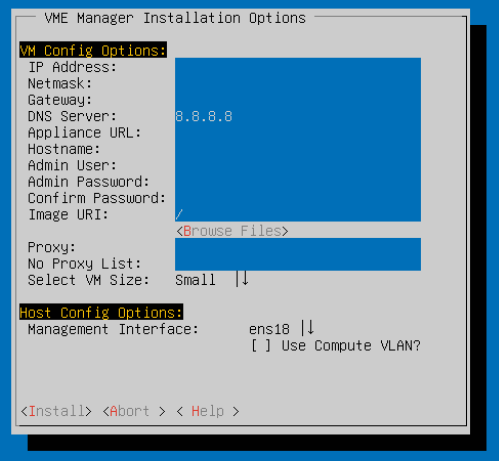
Enter sudo hpe-vm to open the hpe-vm console and select <Install VME Manager>
# sudo hpe-vm

… after what felt like two hours