Ab Juni 2026 laufen die bisherigen Microsoft Secure Boot Zertifikate aus bzw. ab und praktisch jeder PC hat heute ein UEFI Bios mit aktiviertem Secure Boot mit installiertem Windows 11 oder Linux
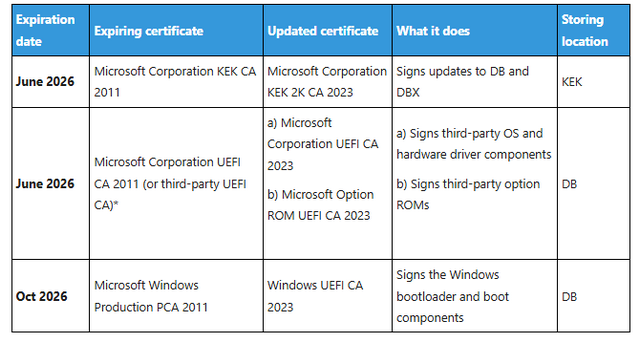
Secure Boot funktioniert wie das Schlüssel-Schloss-Prinzip im UEFI Bios sind Zertifikate von Microsoft gespeichert und das sind bisher die Zertifikate „Microsoft Corporation UEFI CA 2011“ „Microsoft Corporation KEK CA 2011“ und „Windows Production PCA 2011“ welche im Juni 2026 und Oktober 2026 ablaufen und ihre Gültigkeit verlieren
Wird danach der Bootloader von Windows in der Datei bootmgfw.efi durch Windows 11 Updates aktualisiert und trifft auf die alten Zertifikate im UEFI Bios dann startet der PC nicht mehr und das ganze auch umgekehrt
Jeder Anwender weltweit muss seine UEFI Bios Zertifikate aktualisieren der Countdown bis Juni 2026 läuft
PowerShell Script(s) to Get Secure Boot Certificate Information
PS C:\Users\josef> if ( ( Confirm-SecureBootUEFI ) -eq $false ) { Write-Host -ForegroundColor red `n ‚SecureBoot ist aus – Thema hat sich erledigt‘ `n } else { Write-Host -ForegroundColor green `n ‚SecureBoot Status OK‘ `n }
SecureBoot Status OK
PS C:\Users\josef> if ( ( [System.Text.Encoding]::ASCII.GetString((Get-SecureBootUEFI db).bytes) -match ‚Windows Production PCA 2011‘ ) -eq $true ) { Write-Host -ForegroundColor green `n ‚Altes Zertifikat vorhanden‘ `n } else { Write-Host -ForegroundColor red `n ‚Altes Zertifikat nicht vorhanden!‘ `n }
Altes Zertifikat vorhanden
PS C:\Users\josef> if ( ( [System.Text.Encoding]::ASCII.GetString((Get-SecureBootUEFI db).bytes) -match ‚Microsoft Corporation KEK CA 2011‘ ) -eq $true ) { Write-Host -ForegroundColor green `n ‚Altes Zertifikat vorhanden‘ `n } else { Write-Host -ForegroundColor red `n ‚Altes Zertifikat nicht vorhanden!‘ `n }
Altes Zertifikat nicht vorhanden!